

Python Fundamentals – A Complete Guide for Beginners
Python is one of the most popular and beginner-friendly programming languages. It is widely used in web development, data science, automation, AI/ML, and scripting. In this guide, we will explore Python fundamentals step by step with examples and data structure operations.
1. Introduction to Python
Python is a high-level, interpreted, interactive and object-oriented programming language.
Python is designed to be highly readable. It uses English keywords frequently whereas the other languages use punctuations. It has fewer syntactical constructions than other languages.
History of Python:
Python was developed by Guido van Rossum in the late 80’s and early 90’s at the National Research Institute for Mathematics and Computer Science in the Netherlands.
-
Python is derived from many other languages, including ABC, Modula-3, C, C++, Algol-68, Small Talk, and Unix shell and other scripting languages.
Note:
CPythonis thereference implementationof thePython programming language. Written in C and Python, CPython is the default and most widely used implementation of the Python language. -
Python is copyrighted. Like Perl, Python source code is now available under the GNU General Public License (GPL).
-
Python is now maintained by a core development team at the institute, although Guido van Rossum still holds a vital role in directing its progress.
-
Python 1.0was released inNovember 1994. In 2000, Python 2.0 was released. Python 2.7.11 is the latest edition of Python 2. -
Meanwhile, Python 3.0 was released in 2008. Python 3 is not backward compatible with Python 2. The emphasis in Python 3 had been on the removal of duplicate programming constructs and modules so that "There should be one -- and preferably only one -- obvious way to do it."
-
Python 3.13.5 is the latest version of Python 3. There will be more such versions in Future.
Features of Python:

Characteristics of Python
- It supports functional and structured programming methods as well as OOP.
- It can be used as a scripting language or can be compiled to byte-code for building large applications.
- It provides very high-level dynamic data types and supports dynamic type checking.
- It supports automatic garbage collection.
- It can be easily integrated with C, C++, COM, ActiveX, CORBA, and Java.
Installation:
1. Windows:
-
Go to Google and search “Python Download” Or, Visit the official Python website: https://www.python.org/downloads/. Then, click on the latest Python version (Python 3.x.x) under the “Download for Windows” section.
-
Once downloaded, open the installer file.
IMPORTANT: Check the box that says "Add Python 3.x to PATH" before proceeding. This ensures you can use Python from the command line.
-
Open Command Prompt(CMD) or Powershell and type the following commands!
python --version # press Enter
pip --version2. Linux:
- To install Python in Linux(Ubuntu/Debian based distro), Run the following commands in the terminal:
sudo apt update #Update Package List
sudo apt install python3
sudo apt install python3-pip
python3 --version
pip3 --version3. MacOS:
- To install Python in macOS, run the following commands in your terminal:
/bin/bash -c "$(curl -fsSL https://raw.githubusercontent.com/Homebrew/install/HEAD/install.sh)"
brew install python
python3 --version
pip3 --versionIf you don’t want to set-up these things manually in our PC / Laptop, then you can try our Free AI assisted Online Compiler. click on the link below and give it a try: Online Python Compiler - Akash Halder
Basic Syntax
Python shares similarities with other programming languages like Perl, C, and Java, but it also introduces some distinct differences that set it apart. Let’s dive into writing and executing our first Python program, and explore the different modes in which Python can be executed.
First Python Program
Let’s write and execute our 1st Python Program. Python can be executed in different modes:
- Interactive Shell Mode
- Script Mode Programming
1. Interactive Shell Mode
The Interactive Shell, also known as the Python REPL (Read-Eval-Print Loop), allows you to execute Python code line by line and immediately see the results. This is especially useful for testing small code snippets or experimenting with Python commands.
How to access Interactive Shell Mode?
- Open a terminal (Linux/macOS) or Command Prompt (Windows).
- Type python (or python3 if Python 3 is installed alongside Python 2) and press Enter.
You’ll see a Python prompt >>>, indicating that the Python interpreter is ready to execute commands.
Here, the print() function outputs text to the console, and you see the result instantly.
Microsoft Windows [Version 10.0.26100.3775]
(c) Microsoft Corporation. All rights reserved.
C:\Users\ThisPC>python
Python 3.13.3 (tags/v3.13.3:6280bb5, Apr 8 2025, 14:47:33) [MSC v.1943 64 bit (AMD64)] on win32
Type "help", "copyright", "credits" or "license" for more information.
>>> print("Hello World")
Hello World
>>> 5*1
5
>>> 5*2
10
>>> 5*3
15
>>> 5*4
20
>>> 5*5
25
>>> 5*6
30
>>> 5*7
35
>>> 5*8
40
>>> 5*9
45
>>> 5*10
50
>>>exit()
C:\Users\This Pc>Key features of Interactive Shell Mode:
- Immediate feedback: Every line of code is executed as soon as you press
Enter. - Great for quick calculations, testing functions, or learning Python basics.
- You can exit the shell by typing
exit()or pressingCtrl + D.
2. Script Mode Programming
In this mode, you write your Python code in a file (with a .py extension) and execute the file. This is typically used for writing complete Python programs. We will use this mode or method throughout this tutorial.
print("Hello World!")Output:
Hello World!By this point, I guess we all have the same Question?
How did this .py file got executed by Python? Is python an Interpreted or a Compiled Language?
Internal Working of Python:
Python is an interpreted language. However, it is also partially compiled as Python code is first compiled into bytecode (a lower-level form of code) before being interpreted by the Python Virtual Machine (PVM). This combination of compilation and interpretation makes Python highly flexible and dynamic.

The steps involved in running a Python program are:
Source codeis written in a.pyfile.- The
Python interpretercompiles thesource code into bytecode (.pyc files). - The
bytecodeis executed by the Python Virtual Machine (PVM), which interprets it line by line.
Comments in Python
Comments are used to write something which the programmer does not want to execute. This can be used to mark author name, date etc.
Types of Comments
-
Single Line Comment
It is used to write a single line comment just add a‘#’at the start of the line.# This is a Single-Line Comment -
Multi Line Comment
Multiline Comments: To writemulti-line commentsyou can use ‘#’ at each line or you can use the multiline string(""" """). It is often referred asPython Doc String, which is important for Python based projects to let other programmers know what thefunctiondoes. We will know about functions in the upcoming chapters!"""This is an amazing example of a Multiline comment!"""
TIP: When you use
triple quotes (""" """ or ''' ''')inside or outside a function, such as within theprint ()function, it defines a multiline string. The string will retain its format, including line breaks and spacing, and will be printed exactly as it is written.
Print Function
- The
print ()function prints the specified message to the screen, or other standard output device. - The message can be a string, or any other object, the object will be converted into a string before written to the screen.
Syntax:
print(object(s), sep=separator, end=end, file=file, flush=flush)Parameter Values:
| Parameter | Description |
|---|---|
object/objects |
Any object, and as many as you like. Will be converted to string before being printed. |
sep |
Optional. Specifies how to separate the objects if there is more than one. Default is ' '. |
end |
Optional. Specifies what to print at the end. Default is '\n' (line feed). |
file |
Optional. An object with a write method. Default is sys.stdout. |
flush |
Optional. Boolean. If True, the output is flushed. If False, it is buffered. Default is False. |
Examples:
1. Print More Than One Object: You can print multiple objects or strings by separating them with commas.
print("Hello", "how are you?")
# Output: Hello how are you?2. Print Two Messages with a Custom Separator: The sep parameter lets you specify how multiple objects will be separated in the output.
print("Hello", "how are you?", sep="---")
# Output: Hello---how are you?3. Print a Variable: You can easily print variables in Python.
x = "Akash"
print(x)
# Output: Akash
4. Multiline String: Python supports multi-line strings using triple quotes (''' or """).
This is useful for longer texts or formatting large outputs.
multiline_text = """This is a multiline string.
You can write across multiple lines.
It's very useful for longer outputs."""
print(multiline_text)5. Formatted Print Statement Using f-strings: With f-strings (formatted string literals), you can embed expressions inside string literals using curly braces {}. This is useful for dynamically displaying values in strings.
name = "Akash"
age = 20
print(f"My name is {name} and I am {age} years old.")
# Output: My name is Akash and I am 20 years old.Variables and Data Types
Variables
- A variable is the name given to a memory location in a program.
- This means that when you create a variable you reserve some space in the memory.
Based on the data type of a variable, Python interpreter allocates memory and decides what can be stored in the reserved memory. Therefore, Python assign's different data types to variables. For example:
a = 30 # variables = container to store a value.
b = "Akash" # keywords = reserved words in python
c = 71.22 # identifiers = class/function/variable nameRules for Choosing an identifier / Variable:
A variable can have a short name (like x and y) or a more descriptive name (age, carname, total_volume). Rules for Python variables are:-
- A variable name must start with a letter or the underscore character.
- A variable name cannot start with a number.
- A variable name can only contain alpha-numeric characters and underscores (A-z, 0-9, and _)
- Variable names are case-sensitive (age, Age and AGE are three different variables)
- A variable name cannot be any of the Python keywords.
List of Python keywords:
You can also view this, in the Interactive Shell Mode as discussed Earlier
>>> help()
Welcome to Python 3.13's help utility...Enter the name of any module, keyword, or topic to get help on writing
Python programs and using Python modules...enter "modules spam"...enter "q", "quit" or "exit".
help> keywords
Here is a list of the Python keywords. Enter any keyword to get more help.
False class from or
None continue global pass
True def if raise
and del import return
as elif in try
assert else is while
async except lambda with
await finally nonlocal yield
break for not
Examples:
- Allowed Variable Names
myVar = "Akash"
MYVAR = "Akash"
myvar2 = "Akash"
myvar = "Akash"
my_var = "Akash"
_my_var = "Akash"- Not Allowed
2myvar = "John"
my-var = "John"
my var = "John"Data types
- In general, the data types are used to define the type of a variable. It represents the type of data we are going to store in a variable and determines what operations can be done on it.
- Python data types are actually classes, and the defined variables are their instances or objects.
- Since Python is dynamically typed, the data type of a variable is determined at
runtimebased on the assigned value.
Built-In Data Types in Python
-
Numeric Data Types
- int
- flot
- complex
-
String Data Types
-
Sequence Data Types
- list
- tuple
- range
-
Binary Data Types
- bytes
- bytearray
- memoryview
-
Dictionary Data Type
-
Set Data Type
- set
- frozenset
-
Boolean Data Type
-
None Data Type
Note:
Python is a dynamically typed language, meaning it automatically detects the data type of a variable during runtime, based on the value assigned to it. We don't need to explicitly declare the data type.
a = 71 # identifies a as class <int>
b = 88.44 # identifies b as class <float>
name = "Akash" # identifies name as class <str>We can also check the type of datatype in python using the type() function like this:
a = 71
b =88.44
name = "Akash"
print (type(a))
print (type(b))
print (type(name))Output:
<class 'int'>
<class 'float'>
<class 'str'>Typecasting - Type Conversion
-
Typecasting refers to converting one data type into another. Python allows us to change the type of a variable using built-in functions such as
int(),float(), andstr(). -
However, the conversion is only possible if the content of the variable can logically be converted to the target type.
str (31) =>"31" # integer to string conversion int ("32") => 32 # string to integer conversion float (32) => 32.0 # integer to float conversion #...and so on
Note:
Converting between data types is only possible if the conversion makes logical sense.
int("hello") # This will raise a ValueError because
# string cannot be converted to an integer.This is because we can’t convert non-numeric strings (e.g., "hello") into numbers because they don’t represent valid numbers.
Input Function
- The
input()function in Python is used to take user input from the keyboard via the terminalas a string. - It allows the program to interact with the user, letting them provide data, which is then processed during the execution of the program.
Examples
1. Taking Simple Input & Printing It
name = input("Enter your name: ")
print(f"Hello, {name}!")Output:
Enter your name: Akash
Hello, Akash!
2. Input Data as Strings
The value returned by the input() function is always a string by default, even if the user enters a number.
age = input("Enter your age: ")
print(type(age)) # This will show <class 'str'>3. Converting Input to Other Data Types
If you want to work with numbers (e.g., for calculations), you'll need to convert the input into the appropriate data type using typecasting.
• Convert Input to Integer:
age = int(input("Enter your age: "))
print(f"You are {age} years old.")• Convert Input to Float:
price = float(input("Enter the price: "))
print(f"The price is {price}.")Important for Solving Coding Questions
💡Handling Multiple Inputs: Python also allows for taking multiple inputs in one line using the split() method. It take two inputs in a single line and split them into separate variables based on the space between them.
x,y = input("Enter 2 num separated by space: ).split()
print(f"First number: {x}, Second number: {y}")Output:
Enter 2 num separated by space: 10 20
First number: 10, Second number: 20📌 Pro Tip:
You can't truly master Python if you don't Practice the Concepts you just learned. Go and practice your Concepts here: https://www.akashhalder.in/code-compiler
Operators in Python
Python operators are special symbols used to perform specific operations on one or more operands.
The variables, values, or expressions can be used as operands. For example, Python's addition operator (+) is used to perform addition operations on two variables, values, or expressions.
The following are some of the basic terms related to Python operators:
Unary operators: Python operators that require one operand to perform a specific operation are known as unary operators.x = 5 print(-x) # Unary negation: Output will be -5Binary operators: Python operators that require two operands to perform a specific operation are known as binary operators.Operands: Variables, values, or expressions that are used with the operator to perform a specific operation.x, y = 15, 5 print (x / y) #x&y are operands with division operator
Arithmetic Operators
Python Arithmetic operators are used to perform basic mathematical operations such as addition, subtraction, multiplication, division, etc. The following table contains all arithmetic operators with their symbols, names, and examples (assume that the values of a and b are 10 and 20, respectively).
| Operator | Name | Example |
|---|---|---|
+ |
Addition | a + b = 30 |
- |
Subtraction | a - b = -10 |
* |
Multiplication | a * b = 200 |
/ |
Division | b / a = 2 |
% |
Modulus | b % a = 0 |
** |
Exponent | a ** b = 10**20 |
// |
Floor Division | 9 // 2 = 4 |
a = 7
b = 4
c = a + b
print(f"The sum of {a} and {b} is: {c}")Output:
The sum of 7 and 4 is: 11Assignment Operators
Python Assignment operators are used to assign values to variables. Following is a table which shows all Python assignment operators.
| Operator | Example | Same As |
|---|---|---|
= |
x = 5 |
x = 5 |
+= |
x += 3 |
x = x + 3 |
-= |
x -= 3 |
x = x - 3 |
*= |
x *= 3 |
x = x * 3 |
/= |
x /= 3 |
x = x / 3 |
%= |
x %= 3 |
x = x % 3 |
//= |
x //= 3 |
x = x // 3 |
**= |
x **= 3 |
x = x ** 3 |
&= |
x &= 3 |
x = x & 3 |
^= |
x ^= 3 |
x = x ^ 3 |
>>= |
x >>= 3 |
x = x >> 3 |
<<= |
x <<= 3 |
x = x << 3 |
:= |
print(x := 3) |
x = 3 then print(x) |
a = 4-2 # Assign 4-2 in a
print(a)
b = 6
# b += 3 # Increment the value of b by 3 and then assign it to b
b *= 3 # Multiplies the value of b by 3 and then assign it to b
print(b)Output:
2
18Comparison (Relational) Operators
Comparison or Relational operators are used to compare two values.
| Operator | Name | Example |
|---|---|---|
== |
Equal | x == y |
!= |
Not equal | x != y |
> |
Greater than | x > y |
< |
Less than | x < y |
>= |
Greater than or equal to | x >= y |
<= |
Less than or equal to | x <= y |
d = 5 == 5
print(d)
# Output: TrueLogical Operators
Python logical operators are used to combine two or more conditions and check the final result. There are following logical operators supported by Python language.
| Operator | Description | Example |
|---|---|---|
and |
Returns True if both statements are true | x < 5 and x < 10 |
or |
Returns True if one of the statements is true | x < 5 or x < 4 |
not |
Reverse the result | not(x < 5 and x < 10) |
# Truth table of 'or'
print("True or False is ", True or False)
print("True or True is ", True or True)
print("False or True is ", False or True)
print("False or False is ", False or False)
# Truth table of 'and'
print("True and False is ", True and False)
print("True and True is ", True and True)
print("False and True is ", False and True)
print("False and False is ", False and False)
print(not(True))
print(not(False))Output:
True or False is True
True or True is True
False or True is True
False or False is False
True and False is False
True and True is True
False and True is False
False and False is False
False
TrueBitwise Operators
Python Bitwise operator works on bits and performs bit by bit operation. These operators are used to compare binary numbers.
| Operator | Name | Description | Example |
|---|---|---|---|
& |
AND | Sets each bit to 1 if both bits are 1 | x & y |
| |
OR | Sets each bit to 1 if one of two bits is 1 | x | y |
^ |
XOR | Sets each bit to 1 if only one of two bits is 1 | x ^ y |
~ |
NOT | Inverts all the bits | ~x |
<< |
Zero fill left shift | Shift left by pushing zeros in from the right and letting leftmost bits fall off | x << 2 |
>> |
Signed right shift | Shift right by pushing copies of the leftmost bit in from the left, letting rightmost bits fall off | x >> 2 |
a = 10 # 1010 in binary
b = 4 # 0100 in binary
print(f"a & b = {a & b}") # 1010 & 0100 = 0000 (0)
print(f"a | b = {a | b}") # 1010 | 0100 = 1110 (14)
print(f"a ^ b = {a ^ b}") # 1010 ^ 0100 = 1110 (14)
print(f"~a = {~a}") # Inverts the bits of 1010, gives -(a+1), i.e., -11
print(f"a << 1 = {a << 1}") # Left shifts bits of 1010 to 10100 (20)
print(f"a >> 1 = {a >> 1}") # Right shifts bits of 1010 to 0101 (5)Output:
a & b = 0
a | b = 14
a ^ b = 14
~a = -11
a << 1 = 20
a >> 1 = 5Membership Operators
Python's membership operators test for membership in a sequence, such as strings, lists, or tuples.
| Operator | Description | Example |
|---|---|---|
in |
Returns True if a sequence with the specified value is present in the object | x in y |
not in |
Returns True if a sequence with the specified value is not present in the object | x not in y |
my_list = [1, 2, 3, 4, 5]
my_string = "Hello, Akash"
print(6 in my_list)
print("Akash" in my_string)
print(10 not in my_list)
print("Python" not in my_list)Output:
False
True
True
TrueIdentity Operators
Identity operators are used to compare the objects, not if they are equal, but if they are actually the same object, with the same memory location.
| Operator | Description | Example |
|---|---|---|
is |
Returns True if both variables are the same object | x is y |
is not |
Returns True if both variables are not the same object | x is not y |
x = 5
y = 5
z = [1, 2, 3]
w = [1, 2, 3]
print(x is y) # True, since x and y point to the same object in memory
print(z is w) # False, since z and w are different objects, even though their contents are the same
print(x is not y) # False, because x and y are the same object
print(z is not w) # True, since z and w are different objectsOutput:
True
False
False
TrueConditional Statements
Python’s Conditional statements allow programs to make decisions based on different conditions.In Python, conditional statements are essential for controlling the flow of the program, helping it make logical choices depending on certain conditions. The most common conditional statements in Python are if, else, elif, and the newer match-case structure.
Syntax:
if condition:
# code executed if condition is True
elif another_condition:
# executed if first is False but this is True
else:
# executed if none of the above is TrueINDENTATION IN PYTHON:
Indentation plays a vital role in Python's syntax, especially when writing conditional statements. Unlike other programming languages that use curly braces {} to define code blocks, Python uses indentation (whitespace) to define the scope of code.
The level of indentation tells the interpreter which statements belong to which control structure, such as if, else, and loops.
Why is indentation important?
• Structure Definition: Indentation in Python defines the structure of the code, especially for loops, conditionals, and function definitions.
• No Braces: Unlike other languages that use braces {}, Python uses indentation to indicate blocks of code.
• Syntax Requirement: Proper indentation is required for the code to execute without errors; missing or incorrect indentation will lead to an IndentationError.
Example:
age = int(input("Enter your age: "))
if age >= 18:
print("You can vote.")
else:
print("You cannot vote.")Nested If Statements
An if statement can also be nested inside another if statement. This is useful when multiple layers of conditions need to be checked.
num = 36
print ("num = ", num)
if num % 2 == 0:
if num % 3 == 0:
print ("Divisible by 3 and 2")
print("....execution ends....")
Output:
num = 36
Divisible by 3 and 2
....execution ends....Short Hand If-Else
- If we have only one statement to execute, we can put it on the same line as the if statement.
if a > b: print("a is greater than b") - If you have only one statement to execute, one for if, and one for else, you can put it all on the same line:
a = 2 b = 330 print("A") if a > b else print("B")
This technique is known as Ternary Operators, or Conditional Expressions.
- We can also have multiple else statements on the same line:
a = 330 b = 330 print("A") if a > b else print("=") if a == b else print("B")
All these may look cool, but its not recommended to write code like this. As it reduces code readbility may confuse other developers!
Match-Case Statement
-
With the release of
Python 3.10, a pattern matching technique called match-case has been introduced, which is similar to the switch-case construct available inC/C++/Javaetc. Its basic use is to compare a variable against one or more values. -
It takes expression and compares its value to successive patterns given as one or more case blocks. Only the first pattern that matches gets executed.
-
The match-case statement provides a more readable alternative to long chains of if-elif-else conditions, especially for comparing the value of a variable against different patterns.
Syntax:
match variable:
case value1:
# code block for value1
case value2:
# code block for value2
case _:
# default case (similar to 'else')Example
day = input("Enter a day: ")
match day:
case "Monday":
print("Start of the work week.")
case "Friday":
print("End of the work week.")
case _:
print("It's a regular day.")
# Output:
# Enter a day: Monday
# Start of the work week.Control Statements
Control statements in Python determine the flow of execution based on conditions or repetitions. This chapter introduces the concept of loops and how we can manipulate the flow of loops using control statements.
LOOPS
Sometimes we want to repeat a set of statements in our program. For instance: Print 1 to 1000. A loop allows us to repeat a block of code multiple times. Instead of writing the same code again and again, loops help automate tasks by iterating over sequences (like lists, tuples, dictionaries, etc.) or running until a specific condition is met.
Types of Loops
| Loop Type | Description |
|---|---|
| While Loop | Repeats a statement or group of statements while a given condition is TRUE. It tests the condition before executing the loop body. |
| For Loop | Executes a sequence of statements multiple times and abbreviates the code that manages the loop variable. |
While Loop
The while loop in Python is used when we want to execute a block of code as long as a condition is true.
Syntax:
while condition:
# Code block to be executedExample:
i = 1
while i < 5:
print(i)
i += 1Explanation:
- The condition
i < 5is checked before each iteration. - As long as the condition is true, the code block inside the loop is executed.
iis incremented by 1 in each iteration.
Output:
1
2
3
4
Note: If the condition never becomes false, the loop keeps getting executed, making it an INFINITE LOOP.
INFINITE LOOP
An infinite loop occurs when the loop's condition is always true and never becomes false. This leads to the loop running endlessly. Such loops should be used cautiously, as they can cause programs to freeze or crash.
Example of Infinite Loop:
while True:
print("This is an infinite loop!")To break out of an infinite loop, we typically use a break statement, which we will cover later.
FOR LOOP
The for loop in Python provides the ability to loop over the items of any sequence, such as a list, tuple, or a string.
Syntax:
for item in sequence:
# Code block to be executedExample:
fruits = ["apple", "banana", "cherry"]
for fruit in fruits:
print(fruit)Output:
apple
banana
cherry
THE range() FUNCTION
The range() function generates a sequence of numbers, which is often used with loops. It is particularly useful for generating a series of numbers in a for loop.
Syntax:
range(start, stop, step)start: The starting number (default is 0).stop: The end number (exclusive).step: The difference between each number in the sequence (default is 1).
Example:
for i in range(1, 6):
print(i)Output:
1
2
3
4
5
Iterating by Sequence Index
Sometimes we need to iterate over both the index and the value of a sequence. We can achieve this using the range() function combined with len().
Example:
fruits = ["apple", "banana", "cherry"]
for i in range(len(fruits)):
print(f"Index: {i}, Value: {fruits[i]}")Output:
Index: 0, Value: apple
Index: 1, Value: banana
Index: 2, Value: cherry
For Loop with Else
If an else block is used with a for loop, it is executed only when the for loop terminates normally (i.e., not by a break statement).
Example:
l = [1, 7, 8]
for item in l:
print(item)
else:
print("done") # This is printed when the loop exhausts!Output:
1
7
8
done
Nested Loops
A nested loop is a loop inside another loop. The inner loop runs completely for each iteration of the outer loop.
Syntax:
for iterating_var in sequence:
for iterating_var in sequence:
statements(s)
statements(s)Example:
for i in range(1, 10):
for j in range(1, 10):
k = i * j
print(k, end=' ')
print()Output:
1 2 3 4 5 6 7 8 9
2 4 6 8 10 12 14 16 18
3 6 9 12 15 18 21 24 27
4 8 12 16 20 24 28 32 36
5 10 15 20 25 30 35 40 45
6 12 18 24 30 36 42 48 54
7 14 21 28 35 42 49 56 63
8 16 24 32 40 48 56 64 72
9 18 27 36 45 54 63 72 81
LOOP CONTROL STATEMENTS
Loop control statements change the flow of a loop from its normal behavior. Python provides three main loop control statements:
| Control Statement | Description |
|---|---|
| Break Statement | The break statement terminates the loop immediately and the control flows to the statement after the body of the loop. |
| Continue Statement | The continue statement terminates the current iteration of the statement, skips the rest of the code in the current iteration and the control flows to the next iteration of the loop. |
| Pass Statement | The pass keyword in Python is generally used to fill up empty blocks and is similar to an empty statement represented by a semi-colon in languages such as Java, C++, JavaScript. |
Break Statement
The break statement is used to exit the loop before it has iterated through all items or before the condition becomes false. When break is executed, the loop terminates immediately.
Example:
for i in range(1, 6):
if i == 3:
break
print(i)Output:
1
2
Explanation: The loop stops as soon as i becomes 3, due to the break statement.
Continue Statement
The continue statement is used to skip the rest of the code inside the loop for the current iteration and move to the next iteration.
Example:
for i in range(1, 6):
if i == 3:
continue
print(i)Output:
1
2
4
5
Explanation: When i is 3, the continue statement is executed, which skips printing 3 and moves to the next iteration.
Pass Statement
- The
passstatement does nothing and is used as a placeholder. - It is useful when you need a loop but do not want to execute any code inside the loop at the moment.
- The
passkeyword in Python is generally used to fill up empty blocks and is similar to an empty statement represented by a semi-colon in languages such as Java, C++, and Javascript.
Example:
for i in range(1, 6):
pass # Without pass, the program will throw an errorIn this case, nothing will be executed, but the loop is syntactically correct.
2. Data Structures in Python
Strings
A string is a sequence of characters. In Python, strings are immutable, meaning they cannot be changed after they're created. You can define a string using single, double, or triple quotes.
Raw Strings
Raw strings are useful for handling special characters like backslashes (\). By prefixing a string with r or R, you tell Python to treat backslashes as literal characters instead of escape characters.
# without raw string
print('C:\\nowhere') # Output: C:\nowhere
# with raw string
print(r'C:\\nowhere') # Output: C:\\nowhereAccessing Strings
Strings in Python are arrays of bytes representing Unicode characters. While Python doesn't have a char data type, a single character is simply a string with a length of 1. You can access individual characters or parts of a string using square brackets [].
1. Strings as Arrays: You can access specific characters by their index.
a = "Hello, World!"
print(a[1]) # Output: e
2. Looping Through a String:
Because strings are sequences, you can easily iterate through each character using a for loop.
for x in "banana":
print(x)
3. String Length:
Use the len() function to get the number of characters in a string.
a = "Hello, World!"
print(len(a)) # Output: 13
4. Checking for Presence:
The in keyword checks if a substring is present. The not in keyword checks for its absence.
txt = "The best things in life are free!"
print("free" in txt) # Output: True
if "expensive" not in txt:
print("No, 'expensive' is NOT present.")String Slicing
Slicing lets you extract a substring by specifying a range of indices. The syntax is string[start:end], where the end index is exclusive.
1. Basic Slicing:
b = "Hello, World!"
print(b[2:5]) # Output: llo
2. Slice from the Start:
Omitting the start index begins the slice from the first character.
b = "Hello, World!"
print(b[:5]) # Output: Hello
3. Slice to the End:
Omitting the end index extends the slice to the last character.
b = "Hello, World!"
print(b[2:]) # Output: llo, World!4. Negative Indexing: Negative indices slice from the end of the string.
b = "Hello, World!"
print(b[-5:-2]) # Output: orl
5. Slicing with Skip Value:
You can add a third parameter, step, to skip characters. string[start:end:step]
word = "amazing"
print(word[1:6:2]) # Output: mznUpdating a String
Since strings are immutable, you can't modify them directly. Instead, you create a new string by combining parts of the original string. This creates a new memory location for the new string.
my_string = "Python"
new_string = my_string[:2] + "thon"
print(new_string) # Output: PythonConcatenation and Repetition
You can combine strings using the + operator (concatenation) and repeat them using the * operator.
a = "Hello"
b = "World"
c = a + " " + b
print(c) # Output: Hello World
repeat_string = "Python" * 3
print(repeat_string) # Output: PythonPythonPythonEscape Characters
Escape characters let you include special characters in a string. They are preceded by a backslash (\).
| Code | Result |
|---|---|
\' |
Single Quote |
\\ |
Backslash |
\n |
New Line |
\t |
Tab |
String Operators
| Operator | Description | Example |
|---|---|---|
+ |
Concatenation | 'Hello' + 'Python' gives 'HelloPython' |
* |
Repetition | 'Hello' * 2 gives 'HelloHello' |
[] |
Slice | 'Hello'[1] gives 'e' |
[:] |
Range Slice | 'Hello'[1:4] gives 'ell' |
in |
Membership | 'H' in 'Hello' gives True |
not in |
Membership | 'M' not in 'Hello' gives True |
r/R |
Raw String | r'\n' prints \n |
String Formatting
You can't directly combine strings and numbers with the + operator. Python provides several ways to format strings.
1. % Format Operator (Legacy):
This operator is similar to printf() in C.
print("My name is %s and weight is %d kg!" % ('Zara', 21))
# Output: My name is Zara and weight is 21 kg!
2. F-Strings (Python 3.6+):
F-Strings are the modern, preferred way to format strings. They're more readable and efficient. Prefix the string with f and use curly braces {} as placeholders for variables or expressions.
age = 36
txt = f"My name is John, I am {age}"
print(txt) # Output: My name is John, I am 36You can also apply modifiers inside the placeholders.
price = 59
txt = f"The price is {price:.2f} dollars"
print(txt) # Output: The price is 59.00 dollarsString Methods
Python's string methods are powerful tools for manipulating and inspecting strings.
-
capitalize(): Converts the first character to uppercase.s = "python fundamentals: a complete guide for beginners" print(f"capitalize(): '{s.capitalize()}'") # Output: # capitalize(): 'Python fundamentals: a complete guide for beginners' -
upper(): Converts all characters to uppercase.s = "python fundamentals: a complete guide for beginners" print(f"upper(): '{s.upper()}'") # Output: # upper(): 'PYTHON FUNDAMENTALS: A COMPLETE GUIDE FOR BEGINNERS' -
lower(): Converts all characters to lowercase.s = "PYTHON FUNDAMENTALS: A COMPLETE GUIDE FOR BEGINNERS" print(f"lower(): '{s.lower()}'") # Output: # lower(): 'python fundamentals: a complete guide for beginners' -
strip(): Removes leading and trailing whitespace.s = " python fundamentals: a complete guide for beginners " print(f"strip(): '{s.strip()}'") # Output: # strip(): 'python fundamentals: a complete guide for beginners' -
split(separator): Splits a string into a list of substrings.s = "python,fundamentals,a,complete,guide,for,beginners" print(f"split(','): {s.split(',')}") # Output: # split(','): ['python', 'fundamentals', 'a', 'complete', 'guide', 'for', 'beginners'] -
join(iterable): Joins elements of an iterable into a single string.s = ['python', 'fundamentals', 'a', 'complete', 'guide', 'for', 'beginners'] print(f"join(): ' '.join(s)") # Output: # join(): 'python fundamentals a complete guide for beginners' -
replace(old, new): Replaces a substring with a new one.s = "a guide for python beginners" print(f"replace(): '{s.replace('python', 'Java')}'") # Output: # replace(): 'a guide for Java beginners' -
count(substring): Counts occurrences of a substring.s = "python is fun, python is easy" print(f"count('python'): {s.count('python')}") # Output: # count('python'): 2 -
find(substring): Finds the index of a substring, returns-1if not found.s = "python is fun" print(f"find('fun'): {s.find('fun')}") # Output: # find('fun'): 10 -
startswith(prefix): Checks if the string begins with a specific prefix.s = "python is fun" print(f"startswith('python'): {s.startswith('python')}") # Output: # startswith('python'): True -
endswith(suffix): Checks if the string ends with a specific suffix.s = "python is fun" print(f"endswith('fun'): {s.endswith('fun')}") # Output: # endswith('fun'): True -
isalnum(): Checks if all characters are alphanumeric.s1 = "python123" s2 = "python!" print(f"isalnum() for '{s1}': {s1.isalnum()}") print(f"isalnum() for '{s2}': {s2.isalnum()}") # Output: # isalnum() for 'python123': True # isalnum() for 'python!': False -
isalpha(): Checks if all characters are alphabetic.s1 = "python" s2 = "python123" print(f"isalpha() for '{s1}': {s1.isalpha()}") print(f"isalpha() for '{s2}': {s2.isalpha()}") # Output: # isalpha() for 'python': True # isalpha() for 'python123': False -
isdigit(): Checks if all characters are digits.s1 = "12345" s2 = "123a" print(f"isdigit() for '{s1}': {s1.isdigit()}") print(f"isdigit() for '{s2}': {s2.isdigit()}") # Output: # isdigit() for '12345': True # isdigit() for '123a': False -
isupper()/islower(): Checks the case of characters.s1 = "PYTHON" s2 = "python" print(f"isupper() for '{s1}': {s1.isupper()}") print(f"islower() for '{s2}': {s2.islower()}") # Output: # isupper() for 'PYTHON': True # islower() for 'python': True -
title(): Converts the first letter of each word to uppercase.s = "python is fun" print(f"title(): '{s.title()}'") # Output: # title(): 'Python Is Fun' -
swapcase(): Swaps the case of all characters.s = "Python is FUN" print(f"swapcase(): '{s.swapcase()}'") # Output: # swapcase(): 'pYTHON IS fun'
The above string methods are the methods which are used mostly by python programmers.
There are a whole lot of other methods that python provides which can always be referred from the python docs: Python String Methods
Lists
A list in Python is an ordered collection of items (or elements), which can be of different data types (integers, strings, floats, etc.).
Lists are mutable, meaning you can change their content (add, remove, modify elements) after they are created.

Example:
fruits = ["apple", "banana", "cherry"]
numbers = [1, 2, 3, 4, 5]
mixed_list = [1, "Python", 3.14, [2, 3, 4]]Accessing Elements in Lists
fruits = ["apple", "banana", "cherry"]
print(fruits[0]) # Output: apple
print(fruits[2]) # Output: cherry
print(type(fruits)) # Output: <class 'list'>Just like string, we can also use negative indexing to access elements from the end of the list like this:
print(fruits[-1]) # Output: cherryIndexing & Slicing
We can extract portions (or slices) of a list by specifying a range of indices using the slicing syntax: list[start:end
numbers = [1, 2, 3, 4, 5, 6, 7]
# Slicing
print(numbers[1:4]) # Output: [2, 3, 4]
# Slicing with a step
print(numbers[::2]) # Output: [1, 3, 5, 7]
# Reverse the list
print(numbers[::-1]) # Output: [7, 6, 5, 4, 3, 2, 1]Built-in List Functions
len():Returns the number of elements in a list.min():Returns the smallest element in a list.max():Returns the largest element in a list.sum():Returns the sum of elements in a numeric list.sorted():Returns a new list with elements sorted.
Example:
numbers = [3, 1, 4, 1, 5, 9]
print(len(numbers)) # Output: 6
print(min(numbers)) # Output: 1
print(max(numbers)) # Output: 9
print(sum(numbers)) # Output: 23
print(sorted(numbers))#Output: [1, 1, 3, 4, 5,9]Built-in List Methods
append():Adds an element at the end of the list.clear():Removes all elements from the list.copy():Returns a shallow copy of the list.count():Returns the number of elements with the specified value.extend():Adds the elements of an iterable (like another list) to the end of the current list.index():Returns the index of the first element with the specified value.insert():Adds an element at a specified position.pop():Removes the element at a specified position (or the last element if no index is specified).remove():Removes the first occurrence of the specified value.reverse():Reverses the order of the list in place.sort():Sorts the elements of the list in ascending order by default (can take a custom key).
Example:
my_list = [3, 1, 4, 1, 5, 9, 2]
# append()
my_list.append(6)
print("After append:",my_list)#[3, 1, 4, 1, 5, 9, 2,6]
# clear()
copy_list = my_list.copy()
copy_list.clear()
print("After clear:", copy_list) # []
# copy()
copied_list = my_list.copy()
print("Copy of list:",copied_list)#[3, 1, 4, 1, 5, 9,2,6]
# count()
count_1 = my_list.count(1)
print("Count of 1:", count_1) # 2
# extend():
my_list.extend([7, 8, 9])
print("After extend:",my_list)# [3,1,4,1,5,9,2,6, 7,8,9]
# index():
index_5 = my_list.index(5)
print("Index of 5:", index_5) # 4
# insert():
my_list.insert(2, 10)
print("After insert:",my_list)#[3,1,10,4,1,5,9,2,6,7,8,9]
# pop():
popped_element = my_list.pop()
print("After pop:", my_list)#[3,1,10,4,1,5,9, 2, 6, 7, 8]
print("Popped element:", popped_element) # 9
# remove():
my_list.remove(10)
print("After remove:", my_list)#[3,1,4,1,5,9,2, 6, 7, 8]
# reverse():
my_list.reverse()
print("After reverse:", my_list)#[8,7,6,2,9,5,1,4, 1, 3]
# sort()
my_list.sort()
print("After sort:", my_list)#[1,1,2,3,4,5,6,7,8,9]
# sort() with reverse=True
my_list.sort(reverse=True)
print("reverse sort:",my_list)#[9,8,7,6,5,4,3, 2,1,1]The above list methods are the methods which are used mostly by python programmers.
There are a whole lot of other methods that python provides which can always be referred from the python docs: Python Lists Methods
List Comprehension
List comprehension is a concise way to create new lists from existing sequences. It provides a more readable and efficient alternative to a traditional for loop and conditional statements. The basic structure is [expression for item in iterable if condition].
Basic Syntax and Structure
expression: The value to be included in the new list. This can be the item itself or a modified version of it.item: The variable representing each element in the iterable.iterable: Any sequence you can loop through, such as a list, tuple, or arange.if condition(optional): A filter that includes only items for which the condition isTrue.
Examples and Use Cases
-
Filtering Items You can use a list comprehension to filter items based on a condition, which is a common task. For example, to find all fruits in a list that contain the letter "a":
fruits = ["apple", "banana", "cherry", "kiwi", "mango"] newlist = [x for x in fruits if "a" in x] # Output: ['apple', 'banana', 'mango'] -
Manipulating Items The expression part of the syntax allows you to transform items as they're added to the new list. For example, you can convert all fruits to uppercase:
fruits = ["apple", "banana", "cherry", "kiwi", "mango"] newlist = [x.upper() for x in fruits] # Output: ['APPLE', 'BANANA', 'CHERRY', 'KIWI', 'MANGO'] -
Creating Lists of Pairs You can use nested loops within a list comprehension to create lists of pairs, which is a powerful application. For instance, to generate a list of all coordinate pairs
(x, y)from a specified range:coords = [(x, y) for x in range(3) for y in range(3)] # Output: [(0, 0), (0, 1), (0, 2), (1, 0), (1, 1), (1, 2), (2, 0), (2, 1), (2, 2)]
Tuples
A tuple is an ordered, immutable collection of elements. This means once a tuple is created, you cannot add, remove, or change its elements. Tuples are defined using parentheses () and can store a variety of data types.
Creating Tuples
You create a tuple by enclosing its elements in parentheses and separating them with commas.
my_tuple = (1, 2, 3, 'hello')
print(my_tuple) # Output: (1, 2, 3, 'hello')Empty Tuples To create an empty tuple, simply use an empty pair of parentheses.
empty_tuple = ()
print(empty_tuple, type(empty_tuple)) # Output: () <class 'tuple'>Single-Value Tuples A tuple with only one element must include a trailing comma after the value. Without the comma, Python treats it as a regular value inside parentheses, not a tuple.
single_tuple = (5,)
print(single_tuple) # Output: (5,)Accessing Tuple Elements
Like lists, tuples are indexed, with the first element at index 0. You can use square brackets [] to access individual elements. Tuples support both positive and negative indexing.
Positive Indexing
Positive indexing starts from 0 and goes up.
my_tuple = ('apple', 'banana', 'cherry')
print(my_tuple[1]) # Output: banana
Negative Indexing
Negative indexing starts from -1 and works backward from the end of the tuple.
my_tuple = ('apple', 'banana', 'cherry')
print(my_tuple[-1]) # Output: cherry
Slicing
Slicing allows you to extract a range of elements from a tuple, which creates a new tuple. The syntax is [start:end], where the end index is exclusive.
my_tuple = (10, 20, 30, 40, 50)
print(my_tuple[1:4]) # Output: (20, 30, 40)Tuple Methods
While tuples are immutable, Python provides a few built-in methods for working with them.
-
count()Thecount()method returns the number of times a specific value appears in a tuple.my_tuple = (10, 20, 30, 20, 40, 20) occurrences = my_tuple.count(20) print(occurrences) # Output: 3 -
index()Theindex()method finds the first occurrence of a specified value and returns its index. It raises aValueErrorif the value is not found.my_tuple = (10, 20, 30, 40, 50) position = my_tuple.index(30) print(position) # Output: 2You can also provide optional
startandendarguments to search within a specific slice of the tuple.my_tuple = (10, 20, 30, 40, 50, 30) position = my_tuple.index(30, 3) print(position) # Output: 5
Dictionaries and Sets
Dictionary – key-value pairs
A dictionary in Python is an unordered, mutable collection of items where each item is a key-value pair. The keys must be unique and immutable (like strings or numbers), while the values can be of any data type. Dictionaries are defined using curly braces {}.
Creating a Dictionary
You create a dictionary by placing key-value pairs inside curly braces, with a colon separating each key from its value.
person = {
"name": "Akash",
"age": 20,
"profession": "Full Stack Web Developer",
"programmer": True
}
print(type(person), "\n", person)
# OUTPUT:
# <class 'dict'>
# {'name': 'Akash', 'age': 20, 'profession': 'Full Stack Web Developer', 'programmer': True}Accessing Dictionary Items
You can access dictionary values using either square brackets or the get() method.
-
Using Square Brackets
[]: This method is a direct way to retrieve a value using its key. If the key does not exist, it will raise aKeyError.print(person["name"]) # Output: Akash -
Using the
get()Method: Theget()method is a safer way to access a value. It returnsNoneif the key is not found, or a default value you specify, which prevents aKeyError.print(person.get("name")) # Output: Akash print(person.get("marks", "Not Found")) # Output: Not Found
Adding and Updating Items
To add a new key-value pair or modify an existing one, use square brackets and assign a new value.
person = {
"name": "Akash",
"age": 20,
"profession": "Full Stack Web Developer",
"programmer": True
}
# Adding a new key-value pair
person["city"] = "New York"
# Updating an existing key
person["age"] = 20
print(person)
# Output: {'name': 'Akash', 'age': 20, 'profession': 'Full Stack Web Developer', 'programmer': True, 'city': 'New York'}Removing Items
There are several methods for removing items from a dictionary.
pop(key): Removes the specified key and returns its value.popitem(): Removes and returns the last key-value pair added to the dictionary.delStatement: Deletes a specific key or the entire dictionary.clear(): Removes all items, leaving an empty dictionary.
# Using pop()
age = person.pop("age")
print(age) # Output: 20
# Using popitem()
last_item = person.popitem()
print(last_item) # Output: ('city', 'New York')
# Using del
del person["profession"]
print(person) # Output: {'name': 'Akash', 'programmer': True}
# Using clear()
person.clear()
print(person) # Output: {}Looping Through Dictionaries
You can iterate through a dictionary's keys, values, or both simultaneously.
-
Looping through keys:
for key in person.keys(): print(key) -
Looping through values:
for val in person.values(): print(val) -
Looping through both keys & values using
items():for key, val in person.items(): print(key, val, sep=" :: ")
Built-in Dictionary Methods
-
keys(): Returns a view object of all the keys.print(person.keys()) # Output: dict_keys(['name', 'age', 'profession', 'programmer']) -
values(): Returns a view object of all the values.print(person.values()) # Output: dict_values(['Akash', 20, 'Full Stack Web Developer', True]) -
items(): Returns a view object of all key-value pairs as tuples.print(person.items()) # Output: dict_items([('name', 'Akash'), ('age', 20), ...]) -
copy(): Creates a shallow copy of the dictionary.cpy_person = person.copy() print(cpy_person) # Output: {'name': 'Akash', ...} -
update(): Updates the dictionary with key-value pairs from another dictionary or iterable.person.update({"city": "New York", "country": "India"}) print(person) # Output: {'name': 'Akash', ..., 'city': 'New York', 'country': 'India'}
Set – unordered unique elements
A set is an unordered, mutable collection of unique elements. Sets are useful for tasks that require eliminating duplicate entries and for performing mathematical operations like unions and intersections. Because they are unordered, sets do not support indexing.
Creating Sets
You can create a set using curly braces {} or the set() constructor.
fruits = {"apple", "banana", "cherry"}
print(type(fruits), "\n", fruits)
# Output:
# <class 'set'>
# {'banana', 'apple', 'cherry'}It's important to note that an empty curly brace {} creates an empty dictionary, not an empty set. To create an empty set, you must use set().
empty_set = set()
single_item_set = {1,}Accessing and Adding Items
Since sets are unordered, you cannot access elements using an index. You must use a for loop to iterate through the items.
Adding Items:
add(): Adds a single element to the set.update(): Adds multiple elements from an iterable (like a list) to the set.
fruits = {"apple", "banana"}
fruits.add("orange")
fruits.update(["mango", "grape"])
print(fruits)
# Output: {'apple', 'banana', 'orange', 'mango', 'grape'}Removing Items
There are several methods for removing items from a set:
remove(): Removes an item and raises aKeyErrorif it doesn't exist.discard(): Removes an item without raising an error if it's not present.pop(): Removes and returns a random element from the set.clear(): Removes all elements from the set, leaving it empty.
fruits = {"apple", "banana", "cherry"}
fruits.remove("banana") # Works fine
fruits.discard("grape") # No error, as 'grape' isn't there
print(fruits) # Output: {'apple', 'cherry'}Set Operations
Sets are highly efficient for mathematical operations. You can use operators or built-in methods.
| Operation | Operator | Method | Description |
|---|---|---|---|
| Union | | |
.union() |
All unique elements from both sets. |
| Intersection | & |
.intersection() |
Elements common to both sets. |
| Difference | - |
.difference() |
Elements in the first set but not the second. |
| Symmetric Difference | ^ |
.symmetric_difference() |
Elements in either set, but not both. |
set1 = {1, 2, 3}
set2 = {3, 4, 5}
# Union
print(set1 | set2) # Output: {1, 2, 3, 4, 5}
# Intersection
print(set1 & set2) # Output: {3}
# Difference
print(set1 - set2) # Output: {1, 2}
# Symmetric Difference
print(set1 ^ set2) # Output: {1, 2, 4, 5}Other Built-in Set Methods
copy(): Creates a shallow copy of the set.isdisjoint(): Checks if two sets have no elements in common.issubset(): Checks if all elements of one set are present in another.issuperset(): Checks if a set contains all elements of another set.
set1 = {1, 2}
set2 = {1, 2, 3}
print(set1.issubset(set2)) # Output: True
print(set2.issuperset(set1)) # Output: TrueThe above sets methods are the methods which are used mostly by python programmers.
There are a whole lot of other methods that python provides which can always be referred from the python docs: Python Sets Methods
3. Functions and Recursion
When a program gets bigger in size and its complexity grows, it gets difficult for a program to keep track on which piece of code is doing what!
Functions are one of the most critical building blocks in Python programming. They provide modularity and reusability, helping to organize code better and make it more maintainable. This section covers various aspects of functions, including their definitions, types, arguments, anonymous functions, and the concept of recursion.
What is a Function?
A function is a block of organized, reusable code designed to perform a specific task. Python has many built-in functions, like print() and len(),but you can also define your own user-defined functions.
Types of Functions:
-
Buit In Functions
- Already present in Python
- Ex:
print(),input()
-
User Defined Functions
- Defined by the user itself
- Ex:
add_3_num(),factorial()
3 Main Aspects of Functions
def greet(name): # Function definition
print(f" Hello! {name}")
greet("user") # Function call with arguments
# Output: Hello! user- Function Definition: The part containing the exact set of instructions which are executed during the function call.
- Function Call (Invocation): Whenever we want to call a function, we put the name of the function followed by parentheses.
- Passing Value (Arguments): Functions often take arguments (inputs) when called, and these values are processed within the function.
Pass by Reference VS Pass by Value
In Python, function arguments are passed by reference, meaning the function gets a reference to the actual variable. If mutable objects (like lists) are modified inside the function (local scope), the changes reflect outside (global scope).
def modify_list(mylist):
mylist[0] = 99
print("Inside function:", mylist)
original_list = [1, 2, 3]
modify_list(original_list)
print("Outside function:", original_list)
# Output:
# Inside function: [99, 2, 3]
# Outside function: [99, 2, 3]Function Arguments and Other Concepts
Function Arguments
Python functions can accept several types of arguments, each with a distinct purpose.
-
Required Arguments: These arguments must be passed to the function in the correct number and order. If you don't provide them, or if you provide them in the wrong order, the program will raise a
TypeError.def greet(name): print(f"Hello, {name}!") greet("Shruti") # Output: Hello, Shruti! -
Keyword Arguments: You can pass arguments by explicitly naming the parameter they should correspond to. This allows you to pass them in any order, which is particularly useful for functions with many parameters.
def greet(name, message): print(f"{message}, {name}!") greet(message="Good morning", name="Alice") # Output: Good morning, Alice! -
Default Arguments: You can assign a default value to a parameter in the function definition. If a value for that parameter isn't provided during the function call, the default value is used.
def greet(name="Guest"): print(f"Hello, {name}!") greet() # Output: Hello, Guest! greet("Akash") # Output: Hello, Akash! -
Variable-Length Arguments: These allow you to pass an arbitrary number of arguments to a function.
-
*args: This syntax lets you pass a variable number of non-keyword (positional) arguments. Inside the function,argsis a tuple containing these arguments.def myFun(arg1, *args): print("First argument :", arg1) print("Rest values in *args:", end = "") for arg in args: print(" " + arg, end="") myFun('Hello', 'This', 'is', 'Akash Halder') # Output: # First argument : Hello # Rest values in *args: This is Akash -
**kwargs: This lets you pass a variable number of keyword arguments. Inside the function,kwargsis a dictionary where keys are the argument names and values are their corresponding values.def func(**kwargs): print("***** Marks *****") for key, value in kwargs.items(): print(f'{key} -> {value}') marklist = {"Akash":100, "Shruti":80, "Akhi":99} func(**marklist) # Output: # ***** Marks ***** # Akash -> 100 # Shruti -> 80 # Akhi -> 99
-
Anonymous Functions (Lambda)
Lambda functions are small, single-expression functions without a name. They are defined using the lambda keyword and are often used for simple operations where a full function definition would be overkill.
add = lambda x, y: x + y
print(add(5, 3)) # Output: 8Return Statement
The return statement is used to exit a function and send a value back to the caller. A function can return any type of object, or it can return nothing, in which case it implicitly returns None.
def square(num):
return num ** 2
result = square(4)
print(result) # Output: 16Scope of Variables
The scope of a variable determines where in your code it can be accessed.
- Global Variables: Declared outside of any function. They can be accessed from anywhere in the program.
- Local Variables: Declared inside a function. They can only be accessed within that function.
x = 10 # Global variable
def local_scope_example():
x = 5 # Local variable (shadows the global x)
print("Inside function:", x)
local_scope_example() # Output: Inside function: 5
print("Outside function:", x) # Output: Outside function: 10Recursion
Recursion is a programming technique where a function calls itself to solve a smaller version of its problem until it reaches a base case which is a condition that stops the recursion. A classic example is calculating a factorial, where n! = n * (n-1)!.
def factorial(n):
if n == 0 or n == 1:
return 1 # Base Case
else:
return n * factorial(n - 1) # Recursive Call
print(factorial(5)) # Output: 120
4. Modules and Packages
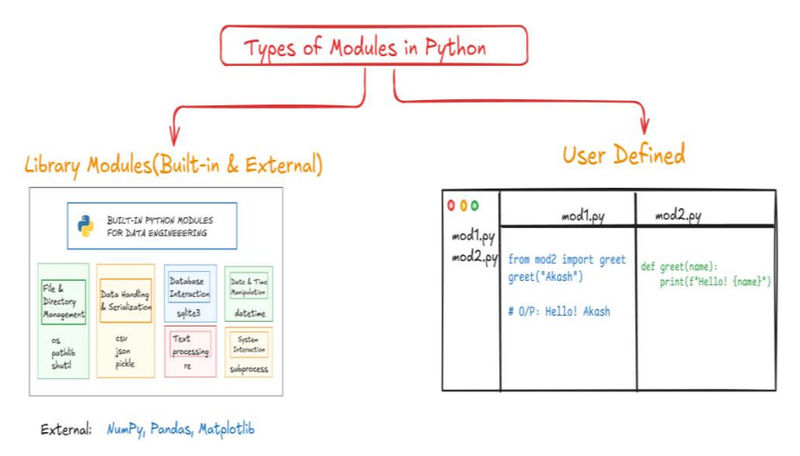
A module is a file containing Python code, such as functions, classes, and variables. They help organize and reuse code by allowing you to break up a large program into smaller, manageable files. A package is a directory that contains multiple modules, providing a way to structure your code hierarchically.
Modules
Modules are simply Python files with a .py extension. You can use their contents in your own programs using the import statement.
Examples and Syntax
To use a module's functions, you can import the entire module and access its contents with dot notation.
import math
print(math.sqrt(16)) # Output: 4.0Alternatively, you can import specific functions directly into your program's namespace, so you don't need to use the module name.
from math import sqrt
print(sqrt(16)) # Output: 4.0To import all functions and variables from a module, you can use the * wildcard. However, this is generally not recommended as it can lead to name conflicts.
from math import *
print(ceil(4.2)) # Output: 5The dir() function can be useful to see all the available attributes and functions within a module.
import math
print(dir(math))Random Module
The random module is used for generating random numbers and sequences.
random.choice(seq): Returns a random element from a sequence.random.randrange(start, stop, step): Returns a random integer from a specified range.random.random(): Returns a random float between0.0and1.0.random.seed(x): Sets the seed to ensure that random numbers are reproducible.random.shuffle(lst): Shuffles the items in a list randomly in-place.
Math Module
The math module provides a wide range of mathematical functions and constants.
math.ceil(x): Rounds a number up to the nearest integer.math.floor(x): Rounds a number down to the nearest integer.math.sqrt(x): Returns the square root of a number.math.pow(x, y): Returnsxraised to the power ofy.abs(x): A built-in function that returns the absolute value of a number.
Do we need to know about all these modules & Its method ??
No, We don't need to learn about these modules. We need to use them as per our need. The fact is, modules are made by some other developers, the team or individual developer who develops the module provides its documentation like how to use this package!
For Example, Explore the Module made by me which got 2.5k Mothly downloads till now - ahcodecompiler and still counting!!!
Packages and pip
A package is a way to organize related modules into a directory structure. A directory becomes a Python package if it contains a special __init__.py file (which can be empty).
Creating a Package
A typical package structure looks like this:
mypackage/
├── __init__.py
├── math_operations.py
└── string_operations.py
__init__.pymakes themypackagedirectory recognizable as a package.math_operations.pyandstring_operations.pyare the modules within the package.
To use the package, you can import its modules or specific functions.
# From math_operations.py
def add(a, b):
return a + b# From __init__.py
from .math_operations import addWith this setup, you can import and use the function like this:
from mypackage import add
print(add(2, 3)) # Output: 5Using pip for Installation
pip is the standard package manager for Python. It allows you to install, update, and manage third-party libraries from the Python Package Index (PyPI), such as NumPy for numerical operations or Flask for web development.
- Install a package:
pip install package_name - Install multiple packages:
pip install numpy pandas - List installed packages:
pip list - Upgrade a package:
pip install --upgrade package_name - Uninstall a package:
pip uninstall package_name
5. File and Exception Handling
File Handling
File handling allows a Python program to interact with files, including reading, writing, and updating them. Python provides a variety of builtin functions and methods to handle files efficiently.

Opening and Closing Files
The built-in open() function is used to open a file. It requires a filename and a mode as arguments and returns a file object. The close() method should always be called when you're done with the file.
file = open("example.txt", "r") # Opens the file in read mode
# ... operations ...
file.close() # Closes the fileFile Modes: The mode determines how a file is used. It is specified as a second argument to the open() function.
| Mode | Description |
|---|---|
r |
Opens a file for reading only. The file pointer is at the beginning. This is the default mode. |
rb |
Opens a file for reading in binary format. |
r+ |
Opens a file for both reading and writing. The file pointer is at the beginning. |
rb+ |
Opens a file for both reading and writing in binary format. |
w |
Opens a file for writing only. It overwrites the file if it exists. If not, it creates a new file. |
wb |
Opens a file for writing in binary format. |
w+ |
Opens a file for both writing and reading. It overwrites the file if it exists, or creates a new one. |
wb+ |
Opens a file for both writing and reading in binary format. |
a |
Opens a file for appending. The pointer is at the end of the file. It creates a new file if it doesn't exist. |
ab |
Opens a file for appending in binary format. |
a+ |
Opens a file for both appending and reading. The pointer is at the end of the file. It creates a new file if it doesn't exist. |
ab+ |
Opens a file for both appending and reading in binary format. |
Reading and Writing
Once a file is open, you can read content using these methods:
read(): Reads the entire file content into a single string.readline(): Reads a single line from the file.readlines(): Reads all lines into a list of strings.
To write content, use:
write(string): Writes a single string to the file.writelines(list_of_strings): Writes a list of strings to the file.
The with Statement
The with statement is the recommended way to handle files. It automatically closes the file, even if an error occurs, so you don't have to manually call close().
with open("example.txt", "r") as file:
content = file.read()
print(content)
# The file is automatically closed hereException Handling
Exceptions are runtime errors that disrupt a program's normal flow. They are different from syntax errors, which are detected before the code runs. Python provides try-except blocks to handle exceptions gracefully, preventing the program from crashing.
try-except Blocks
The try block contains the code that might raise an exception. The except block specifies what to do if a particular type of exception occurs. You can have multiple except blocks to handle different errors.
try:
num = int(input("Enter a number: "))
print(10 / num)
except ZeroDivisionError:
print("You can't divide by zero!")
except ValueError:
print("Invalid input! Please enter a number.")else and finally
You can extend try-except with else and finally blocks:
else: The code in this block executes only if thetryblock completes without any exceptions.finally: The code in this block always executes, regardless of whether an exception occurred or not. It's ideal for cleanup actions like closing files or network connections.
try:
file = open("example.txt", "r")
except FileNotFoundError:
print("File not found!")
else:
content = file.read()
print(content)
file.close()
finally:
print("Execution complete.")Raising Exceptions
The raise statement allows you to intentionally trigger an exception in your code. This is useful for enforcing rules or validating user input.
age = int(input("Enter your age: "))
if age < 0:
raise ValueError("Age cannot be negative!")Common Standard Exceptions
Here are some of the most frequently encountered built-in exceptions in Python:
| Exception Name | Description |
|---|---|
Exception |
Base class for all built-in exceptions. |
ArithmeticError |
Base class for all numeric calculation errors. |
ZeroDivisionError |
Raised when dividing by zero. |
ValueError |
Raised when an argument has the correct type but an invalid value. |
TypeError |
Raised when an operation is performed on an object of an inappropriate type. |
IndexError |
Raised when a sequence index is out of range. |
KeyError |
Raised when a dictionary key is not found. |
FileNotFoundError |
Raised when a file is not found. |
ImportError |
Raised when an import statement fails. |
SyntaxError |
Raised when there is a syntax error in the code. |
NameError |
Raised when a variable name is not found. |
6. Object-Oriented Programming (OOP)
Object-Oriented Programming (OOP) is a programming paradigm that organizes software design around "objects" rather than functions and logic. It models real-world entities by combining data (attributes) and the functions that operate on that data (methods) into a single unit called a class. This approach promotes modularity, reusability, and maintainability.
Benefits of OOP
OOP provides several advantages for software development:
- Modularity: Code is organized into self-contained classes, making it easier to manage.
- Reusability: Classes can be reused in different parts of a program or across multiple projects.
- Scalability: It simplifies the management of large and complex systems.
- Maintainability: Changes in one class are less likely to affect others.
- Encapsulation: Data and methods are bundled together, protecting data integrity.
- Inheritance: New classes can inherit properties, reducing code redundancy.
- Polymorphism: Objects can be treated as instances of their parent class, allowing for flexible code.
Procedural vs. Object-Oriented Programming
| Feature | Procedural Oriented Programming (POP) | Object-Oriented Programming (OOP) |
|---|---|---|
| Approach | Top-down approach | Bottom-up approach |
| Structure | Program is divided into functions | Program is divided into objects |
| Data Access | Data is global and shared | Data is encapsulated within objects |
| Data Security | Less secure as data is exposed | More secure due to encapsulation |
| Focus | Focuses on functions (procedures) | Focuses on objects |
| Code Reusability | Less reusable | High reusability through inheritance |
| Inheritance | Does not support inheritance | Supports inheritance |
| Polymorphism | Does not support polymorphism | Supports polymorphism |
| Examples | C, Pascal | C++, Java, Python |
Classes & Objects
At the core of OOP are classes and objects.
- A class is a blueprint or a template for creating objects. It defines the attributes (data) and methods (behavior) that all objects of that class will possess. Think of a class as the design for a car, specifying that it will have wheels and an engine.
- An object is a specific instance of a class. It represents a real-world entity with its own unique state (attributes) and behavior (methods). Following the car analogy, a red Toyota with 4 wheels is a specific object of the
Carclass.
Creating a Class and an Object
You can define a class using the class keyword.
# Defining an empty class
class Car:
pass
# Defining a class with attributes
class Car:
brand = "Toyota" # This is a class attribute
price = 1000000In this example, brand and price are class attributes, which are shared among all instances of the Car class.
To create an object (or instantiate a class), you call the class as if it were a function.
my_car = Car() # Creating an object
print(my_car.brand) # Output: ToyotaHere, my_car is an instance of the Car class. It can access the class attributes using dot notation. You can create multiple objects from the same class, and each will have its own identity and state.
Class Attributes vs. Instance Attributes
- Class Attributes are shared by all objects of a class. They are defined directly within the class body.
- Instance Attributes are unique to each object. They are assigned within a method using the
selfkeyword. If an instance and a class attribute have the same name, the instance attribute takes precedence for that specific object.
Constructors and self
A constructor is a special method used to initialize an object's state when it is created. In Python, the constructor is the __init__ method.
__init__: This method is automatically called when an object is instantiated. It's where you define and initialize instance attributes.self: This keyword refers to the instance of the class itself. It is the first parameter in any method of a class, including the constructor. It allows methods to access the object's attributes and other methods.
Parameterized vs. Non-Parameterized Constructors
- A non-parameterized constructor has no arguments besides
self. It initializes attributes with fixed, predefined values.class Car: def __init__(self): self.brand = "Toyota" - A parameterized constructor takes additional arguments to initialize an object with values provided during instantiation.
class Car: def __init__(self, brand, color): self.brand = brand self.color = color my_car = Car("Toyota", "Red") print(my_car.brand) # Output: Toyota
The Four Pillars of OOP
OOP is built on four core principles: Encapsulation, Inheritance, Polymorphism, and Abstraction.
1. Encapsulation
Definition: Encapsulation is the practice of bundling data (attributes) and the methods that operate on that data into a single unit (a class). It controls access to the data, protecting it from accidental or unauthorized modification.
Analogy: Think of a car's engine. The driver interacts with the car through controls like the steering wheel and pedals (public methods), but doesn't need to see or manipulate the internal engine components directly. Encapsulation hides the complex inner workings and provides a simple, controlled interface.
Implementation: Python uses name mangling to implement "private" attributes, which start with two underscores (__).
class Account:
def __init__(self, balance):
self.__balance = balance # Private attribute
def get_balance(self):
return self.__balance2. Inheritance
Definition: Inheritance is a mechanism that allows a new class (derived class or child) to inherit attributes and methods from an existing class (base class or parent). This promotes code reuse and a logical "is-a" relationship (e.g., an ElectricCar is a Car).
Analogy: A child inherits traits like eye color or height from their parents. Similarly, a subclass inherits all the properties and behaviors of its superclass.
Types of Inheritance:
- Single: One child class inherits from one parent class.
- Multilevel: A class inherits from a parent, which in turn inherits from another class (e.g.,
Childinherits fromParent, andParentinherits fromGrandparent). - Hierarchical: Multiple classes inherit from a single parent class.
- Multiple: A class inherits from more than one parent class.
Example:
class Car:
def start(self):
print("Car is starting.")
class ElectricCar(Car):
def charge(self):
print("Car is charging.")
tesla = ElectricCar()
tesla.start() # Inherited from the Car class
tesla.charge() # Defined in the ElectricCar class3. Polymorphism
Definition: Polymorphism means "many forms." It allows objects of different classes to be treated as objects of a common superclass. This means a single function or method can behave differently based on the object it is called on.
Example: Method Overriding occurs when a derived class provides its own implementation of a method that is already defined in its parent class.
class Bird:
def sound(self):
print("Chirp")
class Sparrow(Bird):
def sound(self): # Overrides the parent method
print("Tweet")
bird = Sparrow()
bird.sound() # Output: Tweet (The overridden method is called)4. Abstraction
Definition: Abstraction is the process of hiding complex implementation details and showing only the essential features of an object. It allows you to focus on what an object does rather than how it does it.
Abstract Classes:
- An abstract class is a blueprint that cannot be instantiated on its own. It's meant to be inherited by other classes.
- Abstract classes often define abstract methods using the
@abstractmethoddecorator, which are methods without an implementation. Any concrete (non-abstract) subclass must provide an implementation for these methods.
Example:
from abc import ABC, abstractmethod
# Abstract Class
class Shape(ABC):
@abstractmethod
def area(self):
pass
class Circle(Shape):
def __init__(self, radius):
self.radius = radius
def area(self): # Must implement the abstract method
return 3.14 * self.radius ** 2
circle = Circle(5)
print(f"Circle Area: {circle.area()}") # Output: Circle Area: 78.5Here, the Shape class abstracts the concept of a shape, requiring any subclass to implement the area method. This ensures a consistent interface for all shapes.
7. Advanced Python
Decorators
A decorator is a function that extends the functionality of another function without explicitly modifying it. It takes a function as an argument, adds extra behavior within a nested "wrapper" function, and then returns the wrapper. This pattern is commonly used for tasks like logging, timing, or authentication.
The @ syntax is a shortcut for applying a decorator. For example, @timer is equivalent to calling slow_function = timer(slow_function). The nested wrapper function ensures that the original function is called with its arguments (*args, **kwargs) while being wrapped in the new logic.
Basic Example:
def decorators(func):
def wrapper():
print("This is about to execute a function...")
func()
print("Finished Executing Function!!")
return wrapper
def say_hello():
print("Hello User!")
f = decorators(say_hello)
f()
'''
f will look something like this
def f():
print("This is about to execute a function...")
print("Hello User!")
print("Finished Executing Function!!")
'''
# Better Syntax:
@decorators
def say_hello():
print("Hello User!")
say_hello()
Another Useful Example
import time
def timer(func):
"""A decorator that measures a function's execution time."""
def wrapper(*args, **kwargs):
start = time.time()
result = func(*args, **kwargs)
end = time.time()
print(f"Time taken: {end - start:.4f}s")
return result
return wrapper
@timer
def slow_function():
time.sleep(2)
print("Done!")
slow_function()
# Output:
# Done!
# Time taken: 2.0002sWalrus Operator :=
The walrus operator (:=), introduced in Python 3.8, is an assignment expression. It allows you to assign a value to a variable within an expression, such as an if statement or a list comprehension. This can make code more concise and efficient by avoiding redundant calculations.
# Without the walrus operator, you need two lines
n = len("Python")
if n > 5:
print(f"Length is {n}")
# With the walrus operator, you can combine them
if (n := len("Python")) > 5:
print(f"Length is {n}")
# Output:
# Length is 6map, filter, reduce
These are higher-order functions from functional programming that provide concise ways to process iterables. They are often used with anonymous lambda functions.
-
map(): Applies a function to every item in an iterable and returns a new iterable with the transformed results. It's used for transformation.nums = [1, 2, 3, 4] doubled_nums = list(map(lambda x: x*2, nums)) print(doubled_nums) # Output: [2, 4, 6, 8] -
filter(): Creates a new iterable with items from the original iterable that satisfy a certain condition (i.e., the function returnsTrue). It's used for selection.nums = [1, 2, 3, 4] even_nums = list(filter(lambda x: x % 2 == 0, nums)) print(even_nums) # Output: [2, 4] -
reduce(): Applies a function cumulatively to the items of an iterable, reducing it to a single value. This function is found in thefunctoolsmodule. It's used for aggregation.from functools import reduce nums = [1, 2, 3, 4] sum_nums = reduce(lambda x, y: x + y, nums) print(sum_nums) # Output: 10
Conclusion
Now that you've covered the core concepts of Python—from fundamental data types and control flow to advanced topics like OOP and decorators—the most critical step is to practice. Theoretical knowledge alone isn't enough; true mastery comes from applying what you've learned. Programming is a skill, and like any skill, it gets better with hands-on experience. Writing code helps you understand how different concepts interact, debug errors, and think like a problem-solver.
To help you on your journey, we encourage you to use our online Python compiler at https://www.akashhalder.in/code-compiler. It provides an instant environment for you to write, run, and test your code without any local setup. Use it to try out the examples from this guide, experiment with new ideas, and solve programming challenges.
For those looking to dive deeper, try experimenting with our custom module, ahcodecompiler. See if you can figure out how to import it and create something new. This kind of exploration will solidify your understanding and prepare you for building more complex projects. Keep practicing, keep coding, and have fun!
