


Mastering MySQL: A Practical Guide for Beginners & Developers
One of the most widely used databases in the world is MySQL. It powers almost everything from massive enterprise systems to tiny blogs.
In this guide, we’ll take you through installation, setup, queries, constraints, functions, joins, indexes, subqueries, transactions, stored procedures, triggers, and more — all with easy explanations and examples.
Installing MySQL
What is MySQL workbench?
MySQL Workbench is a visual tool for database architects, developers, and DBAs. It provides data modeling, SQL development, and comprehensive administration tools for server configuration, user administration, backup, and much more.
What is a Database Management System (DBMS)?
A Database Management System (DBMS) is a software that interacts with end users, applications, and the database itself to capture and analyze data.
It allows for the creation, retrieval, updating, and management of data , also known as CRUD operation in databases. If you know one DBMS, you can easily transition to another, as they share similar concepts and functionalities.
To learn in depth about DBMS checkout our tutorials : DBMS Tutorial
On Windows/macOS:
- Download installer: dev.mysql.com/downloads/installer.
- Choose Developer Default.
- Set a root password.
- Install MySQL Workbench — a GUI for queries, modeling, and administration.
On Ubuntu/Linux:
sudo apt update
sudo apt install mysql-server
sudo mysql_secure_installation
sudo mysql
# In some Linux distros like Parrot OS and Kali Linux.
# MySQL server comes pre-installed, in that case execute these commands:
sudo systemctl start mysql
sudo systemctl enable mysql
sudo mysqlCreate a user:
CREATE USER '<username>'@'localhost' IDENTIFIED BY '<your_pass>';
GRANT ALL PRIVILEGES ON *.* TO '<username>'@'localhost' WITH GRANT OPTION;
FLUSH PRIVILEGES;
EXIT;Login:
mysql -u <username> -p # It will now prompt you to enter your set password.💡Tip: Always use a strong password in production.
Now you can install the MySQL Workbench from the App Store, or visit MySQL Workbench Download page for Linux website. Once installed, connect to your MySQL server using the credentials you created earlier
Do you really need to go through this long process of installation??
The answer is no, you can try out our Free SQL Online Compiler, there you can run all these SQL codes in the editor: SQL Editor - Akash Halder.
The only thing you don't need to do is creating a database in the editor:
-- YOU DON'T NEED to CREATE a DATABASE in the Online Editor
CREATE DATABASE IF NOT EXISTS db;
USE db;Getting Started with MySQL
What is a Database?
A database is a container that stores related data in an organized way. In MySQL, a database holds one or more tables.
Think of it like:
-
Folder analogy:
- A database is like a folder.
- Each table is a file inside that folder.
- The rows in the table are like the content inside each file.
-
Excel analogy:
- A database is like an Excel workbook.
- Each table is a separate sheet inside that workbook.
- Each row in the table is like a row in Excel.
Step 1: Create a Database
CREATE DATABASE db1;After creating the database, either:
- Right-click it in MySQL Workbench and select “Set as Default Schema”, or
- Use this SQL command:
USE db1;Step 2: Create a Table
Now we’ll create a simple users table that will store basic user info along with there data types and constraints like this:
CREATE TABLE users (
id INT AUTO_INCREMENT PRIMARY KEY,
name VARCHAR(255) NOT NULL,
email VARCHAR(255) NOT NULL,
gender ENUM('Male', 'Female','Other'),
dob DATE,
created_at TIMESTAMP DEFAULT CURRENT_TIMESTAMP
);What are Data Types in MySQL ?
Just like other programming languages we have data types in SQL. It tells the DBMS that which type of data do we want to store in our Database, some common data types in SQL are:
INT: Integer type, used for whole numbers.VARCHAR(100): Variable-length string, up to 100 characters.ENUM: A string object with a value chosen from a list of permitted values. eg.gender ENUM('Male', 'Female', 'Other')DATE: Stores date values. eg date_of_birth (dob) DATETIMESTAMP: Stores date and time, automatically set to the current timestamp when a row is created.BOOLEAN: Stores TRUE or FALSE values, often used for flags like is_active .DECIMAL(10, 2): Stores exact numeric data values, useful for financial data. The first number is the total number of digits, and the second is the number of digits after the decimal point.
What are Constraints in MySQL ?
Constraints are like checks (similar to what we do with conditionals in programming). We want to insert data based on certain conditions, some common constraints in SQL are:
AUTO_INCREMENT: Automatically generates a unique number for each row.PRIMARY KEY: Uniquely identifies each row in the table.NOT NULL: Ensures a column cannot have a NULL value.UNIQUE: Ensures all values in a column are different.-
DEFAULT: Sets a default value for a column if no value is provided. eg.created_at TIMESTAMP DEFAULT CURRENT_TIMESTAMP,is_active BOOLEAN DEFAULT TRUE
Step 3: Drop the Database
We can also delete the entire database (and all its tables) using:
DROP DATABASE db1;Be careful — this will delete everything in that database.
Renaming a Table
To rename an existing table, you can use the RENAME TABLE command.
RENAME TABLE users TO customers;To rename it back:
RENAME TABLE customers TO users;Altering a Table
You can use ALTER TABLE to modify an existing table.
Add a Column
To add a new column to a table:
ALTER TABLE users ADD COLUMN is_active BOOLEAN DEFAULT TRUE;Drop a Column
To remove a column from a table:
ALTER TABLE users DROP COLUMN is_active;Modify a Column Type
To change the data type of an existing column:
ALTER TABLE users MODIFY COLUMN name VARCHAR(150);Move a Column
You can move columns to a new position within the table's structure.
To move a column (e.g., email) to the first position:
ALTER TABLE users MODIFY COLUMN email VARCHAR(100) FIRST;To move a column after another column (e.g., move gender after name):
ALTER TABLE users MODIFY COLUMN gender ENUM('Male', 'Female', 'Other') AFTER name;CRUD Operations in MySQL
CRUD stands for Create, Read, Update, Delete. These are the four fundamental operations for managing data in relational databases. Below is a step-by-step explanation with examples.
Before performing CRUD operation on Database, let's first creat a database first:
CREATE DATABASE IF NOT EXISTS starter_sql;
USE starter_sql;
CREATE TABLE users (
id INT AUTO_INCREMENT PRIMARY KEY,
name VARCHAR(255) NOT NULL,
email VARCHAR(255) NOT NULL,
gender ENUM('Male', 'Female','Other'),
date_of_birth DATE,
created_at TIMESTAMP DEFAULT CURRENT_TIMESTAMP
);
1. CREATE – Inserting Data
The CREATE part of CRUD corresponds to inserting new records into a table using the INSERT INTO statement.
Insert All Columns (Full Row Insert)
INSERT INTO users VALUES
(1, 'Alice', 'alice@example.com', 'Female', '1995-05-14', DEFAULT);- Here, all column values are provided in the exact order defined in the table.
id = 1is given manually, but in most cases it isAUTO_INCREMENT.
Insert by Specifying Column Names (Preferred Method)
INSERT INTO users (name, email, gender, date_of_birth) VALUES
('Bob', 'bob@example.com', 'Male', '1990-11-23');- MySQL will automatically generate the
idandcreated_atvalues. - Safer than full row insert because column order changes will not break the query.
Insert Multiple Rows
INSERT INTO users (name, email, gender, date_of_birth) VALUES
('Charlie', 'charlie@example.com', 'Other', '1988-02-17'),
('David', 'david@example.com', 'Male', '2000-08-09'),
('Eva', 'eva@example.com', 'Female', '1993-12-30');- Multiple rows are inserted in one query.
- This is more efficient than inserting each row individually.
2. READ – Selecting Data
The READ operation retrieves data from tables using the SELECT statement.
Select All Columns
SELECT * FROM users;- Fetches every column and every row in the
userstable. Useful for debugging, but not efficient for production.
Select Specific Columns
SELECT name, email FROM users;- Fetches only the
nameandemailfields.
Filtering Rows
SELECT name, salary FROM users WHERE salary > 60000;- Retrieves users with salaries greater than 60,000.
Sorting and Limiting Results
SELECT name, salary FROM users ORDER BY salary DESC LIMIT 5;- Displays the top five users with the highest salaries.
Working with Conditions
SELECT * FROM users WHERE gender != 'Female'; -- Not Equal to
--or
SELECT * FROM users WHERE gender <> 'Female';
SELECT * FROM users WHERE gender = 'Female' AND salary >= 70000;- Retrieves only male users.
- Retrieves only female users earning greater than equal to 70,000.
BETWEEN Clause and AND / OR
SELECT * FROM users WHERE date_of_birth BETWEEN '1990-01-01' AND '2000-12-31';
-- AND / OR
SELECT * FROM users WHERE gender = 'Female' AND date_of_birth > '1990-01-01';
SELECT * FROM users WHERE gender = 'Male' OR gender = 'Other';IN Clause
SELECT * FROM users WHERE gender IN ('Male', 'Other');LIKE (Pattern Matching)
SELECT * FROM users WHERE name LIKE 'A%'; -- Starts with A
SELECT * FROM users WHERE name LIKE '%a'; -- Ends with a
SELECT * FROM users WHERE name LIKE '%li%'; -- Contains 'li'3. UPDATE – Modifying Data
The UPDATE part modifies existing data in a table.
Update a Single Column
UPDATE users
SET name="Akash" WHERE id=1;- Changes the name of the user whose
idis 1 to "Alicia".
Update Multiple Columns
UPDATE users
SET name = 'Robert', email = 'robert@example.com'
WHERE id = 2;- Updates both the
nameandemailfor the user withid = 2.
Update Without WHERE (Affects All Rows)
UPDATE users
SET gender = 'Other';- Changes the
genderof every user to "Other". - This can be destructive; always use
WHEREunless intentional.
4. DELETE – Removing Data
The DELETE part removes records from a table.
Delete One Row
DELETE FROM users WHERE id = 3;- Deletes the user with
id = 3.
Delete Multiple Rows
DELETE FROM users WHERE gender = 'Other';- Deletes all users whose gender is recorded as "Other".
Delete All Rows (But Keep Table Structure)
DELETE FROM users;- Removes all rows from the
userstable but keeps the table structure.
Drop the Entire Table
DROP TABLE users;- Deletes both the table structure and all its data permanently.
Key Points to Remember
- INSERT is used to add new records.
- SELECT is used to read data from a table.
- UPDATE is used to modify existing data.
- DELETE is used to remove data.
- Always use
WHEREinUPDATEandDELETEto avoid affecting all rows unintentionally.
MySQL Functions
SQL functions help us analyze, transform, or summarize data in your tables.
We’ll use the users table which includes:
id,name,email,gender,date_of_birth,salary,created_at
To save time copy and paste this to get the initial data for practice:
-- Create users table
CREATE DATABASE IF NOT EXISTS startersql;
USE startersql;
CREATE TABLE users (
id INT AUTO_INCREMENT PRIMARY KEY,
name VARCHAR(100) NOT NULL,
email VARCHAR(100) UNIQUE NOT NULL,
gender ENUM('Male', 'Female', 'Other'),
date_of_birth DATE,
salary DECIMAL(10, 2),
created_at TIMESTAMP DEFAULT CURRENT_TIMESTAMP
);
-- Insert Data into the table
INSERT INTO users (name, email, gender, date_of_birth, salary) VALUES
('Aarav', 'aarav@example.com', 'Male', '1995-05-14', 65000.00),
('Ananya', 'ananya@example.com', 'Female', '1990-11-23', 72000.00),
('Raj', 'raj@example.com', 'Male', '1988-02-17', 58000.00),
('Sneha', 'sneha@example.com', 'Female', '2000-08-09', 50000.00),
('Farhan', 'farhan@example.com', 'Male', '1993-12-30', 61000.00),
('Priyanka', 'priyanka@example.com', 'Female', '1985-07-12', 84000.00),
('Aisha', 'aisha@example.com', 'Female', '1997-03-25', 56000.00),
('Aditya', 'aditya@example.com', 'Male', '1992-06-17', 69000.00),
('Meera', 'meera@example.com', 'Female', '1989-09-05', 77000.00),
('Ishaan', 'ishaan@example.com', 'Male', '2001-10-02', 45000.00),
('Tanvi', 'tanvi@example.com', 'Female', '1994-04-18', 62000.00),
('Rohan', 'rohan@example.com', 'Male', '1986-12-01', 75000.00),
('Zoya', 'zoya@example.com', 'Female', '1998-01-15', 54000.00),
('Karan', 'karan@example.com', 'Male', '1990-08-22', 68000.00),
('Nikita', 'nikita@example.com', 'Female', '1987-03-10', 71000.00),
('Manav', 'manav@example.com', 'Male', '1996-11-29', 61000.00),
('Divya', 'divya@example.com', 'Female', '1991-02-28', 57000.00),
('Harshit', 'harshit@example.com', 'Male', '1993-09-09', 65000.00),
('Ritika', 'ritika@example.com', 'Female', '1999-05-05', 52000.00),
('Imran', 'imran@example.com', 'Male', '1995-07-30', 63000.00),
('Juhi', 'juhi@example.com', 'Female', '1992-10-14', 59000.00),
('Tushar', 'tushar@example.com', 'Male', '1990-01-08', 73000.00),
('Lata', 'lata@example.com', 'Female', '1984-11-11', 78000.00),
('Yash', 'yash@example.com', 'Male', '1997-06-06', 64000.00),
('Fatima', 'fatima@example.com', 'Female', '1993-03-03', 55000.00);1. Aggregate Functions
These function return a single value from a set of rows.
-
COUNT(): Count total no. of users.SELECT COUNT(*) FROM users; -- Count users who are Female: SELECT COUNT(*) FROM users WHERE gender = 'Female'; -
MIN()andMAX(): Get the minimum and maximum salary.SELECT MIN(salary) AS min_salary, MAX(salary) AS max_salary FROM users; -
SUM():- Calculate the total salary Payout.SELECT SUM(salary) AS total_payroll FROM users; -
AVG(): Find average salary.SELECT AVG(salary) AS avg_salary FROM users; -
Grouping with
GROUP BY: Average salary by gender.SELECT gender, AVG(salary) AS avg_salary FROM users GROUP BY gender;
2. String Functions
-
LENGTH(): Get the length of a string (usernames).SELECT name, LENGTH(name) AS name_length FROM users; -
LOWER()andUPPER(): Converts names to lowercase and uppercase.SELECT name, LOWER(name) AS lowercase_name FROM users; SELECT name, UPPER(name) AS uppercase_name FROM users; -
CONCAT(): Combine name and email.SELECT CONCAT(name, ' | <', email, '>') AS user_contact FROM users;
3. Date Functions
-
NOW(): Get Current Date and Time (24 hrs Format).SELECT NOW(); -
YEAR(),MONTH(),DAY(): Extract parts of date_of_birth.SELECT name, YEAR(date_of_birth) AS birth_year FROM users; SELECT name, MONTH(date_of_birth) AS birth_month FROM users; SELECT name, DAY(date_of_birth) AS birth_day FROM users; -
DATEDIFF(): Find number of days between today and birthdate.SELECT name, DATEDIFF(CURDATE(), date_of_birth) AS days_lived FROM users; -
TIMESTAMPDIFF(): Calculate age in years.SELECT name, TIMESTAMPDIFF(YEAR, date_of_birth, CURDATE()) AS age FROM users;
4. Mathematical Functions
-
ROUND(),FLOOR(),CEIL()SELECT salary, ROUND(salary) AS rounded, FLOOR(salary) AS floored, CEIL(salary) AS ceiled FROM users; -
MOD(): Find even or odd user IDs:SELECT id, MOD(id, 2) AS remainder FROM users;
5. Conditional Functions
-
IF(): Check if users are male or femaleSELECT name, gender, IF(gender = 'Male', 'Yes', 'No') AS is_male FROM users;
Summary Table: Functions in SQL
| Function | Purpose |
|---|---|
COUNT() |
Count rows |
SUM() |
Total of a column |
AVG() |
Average of values |
MIN() / MAX() |
Lowest / highest value |
LENGTH() |
String length |
CONCAT() |
Merge strings |
YEAR() / DATEDIFF() |
Date breakdown / age |
ROUND() |
Rounding numbers |
IF() |
Conditional logic |
Understanding PRIMARY KEY & FOREIGN KEY in MySQL
What is a Primary Key?
A PRIMARY KEY is a constraint in SQL that uniquely identifies each row in a table. It is one of the most important concepts in database design. A PRIMARY KEY :
- Must be unique
- Cannot be NULL
- Is used to identify rows in a table
- Can be a single column or a combination of columns
- Each table can have only one primary key
Example:
CREATE TABLE users (
id INT AUTO_INCREMENT PRIMARY KEY,
name VARCHAR(100)
);How Is PRIMARY KEY Different from UNIQUE?
At first glance, PRIMARY KEY and UNIQUE might seem similar since both prevent duplicate values. But there are important differences:
| Feature | PRIMARY KEY |
UNIQUE |
|---|---|---|
| Must be unique | Yes | Yes |
| Allows NULL values | No | Yes (one or more NULLs allowed) |
| How many allowed | Only one per table | Can have multiple |
| Required by table | Recommended, often required | Optional |
| Dropping | Cannot be easily dropped | Can be dropped anytime |
Example with UNIQUE
CREATE TABLE users (
id INT AUTO_INCREMENT PRIMARY KEY,
email VARCHAR(100) UNIQUE,
name VARCHAR(100)
);In this example:
idis the unique identifier for each row.emailmust be unique, but is not the primary key.
Can I Drop a PRIMARY KEY?
Yes, but it is more restricted than dropping a UNIQUE constraint.
ALTER TABLE users DROP PRIMARY KEY;This may fail if the primary key is being used elsewhere (like in a foreign key or auto_increment column).
To drop a UNIQUE constraint:
ALTER TABLE users DROP INDEX email;Auto Increment
In MySQL, a PRIMARY KEY is often used with the AUTO_INCREMENT attribute to automatically generate unique values for new rows.
CREATE TABLE users (
id INT AUTO_INCREMENT PRIMARY KEY,
name VARCHAR(100)
);This means that every time you insert a new row, MySQL will automatically assign a unique value to the id column. You can change the starting value of AUTO_INCREMENT using:
ALTER TABLE users AUTO_INCREMENT = 1000;Foreign Keys in MySQL
A foreign key is a column that creates a link between two tables. It ensures that a value in one table must match a value in another table, which helps maintain data integrity.
Why Use Foreign Keys?
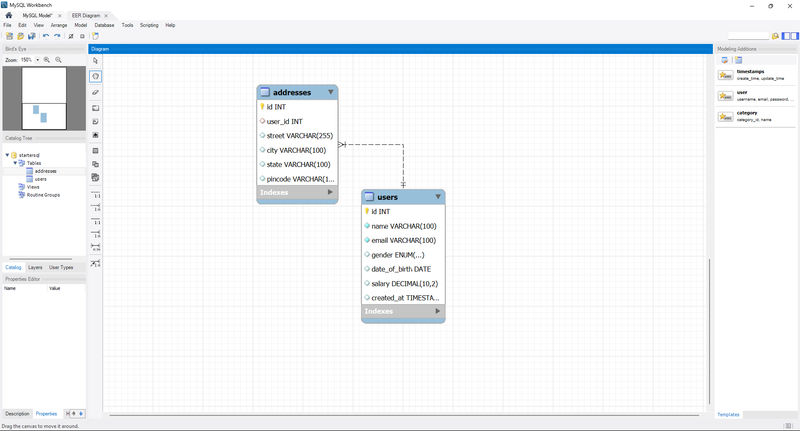
Foreign keys are essential for relational database design. For example, instead of storing a user's address in the users table, you can create a separate addresses table and use a foreign key to link each address to its corresponding user. This prevents data duplication and keeps your database organized.
Creating a Table with a Foreign Key & Insert some data
You can define a foreign key when you create a table. In this example, the addresses table has a foreign key that links to the users table.
USE startersql;
DROP TABLE IF EXISTS addresses;
CREATE TABLE addresses (
id INT AUTO_INCREMENT PRIMARY KEY,
user_id INT,
street VARCHAR(255),
city VARCHAR(100),
state VARCHAR(100),
pincode VARCHAR(10),
CONSTRAINT fk_user FOREIGN KEY (user_id) REFERENCES users(id) ON DELETE CASCADE
);
INSERT INTO addresses (user_id, street, city, state, pincode) VALUES
(1, '221B MG Road', 'Mumbai', 'Maharashtra', '400001'),
(22, '14 Park Street', 'Kolkata', 'West Bengal', '700016'),
(3, '32 Residency Road', 'Bengaluru', 'Karnataka', '560025'),
(24, '5 North Usman Road', 'Chennai', 'Tamil Nadu', '600017'),
(5, '17 Hazratganj', 'Lucknow', 'Uttar Pradesh', '226001'),
(6, '55 Banjara Hills', 'Hyderabad', 'Telangana', '500034'),
(7, '88 Connaught Place', 'Delhi', 'Delhi', '110001'),
(8, '10 MG Marg', 'Dehradun', 'Uttarakhand', '248001'),
(9, '23 Brigade Road', 'Bengaluru', 'Karnataka', '560025'),
(10, '45 Marine Drive', 'Mumbai', 'Maharashtra', '400020'),
(11, '67 Ashoka Road', 'Delhi', 'Delhi', '110001'),
(12, '89 MG Road', 'Pune', 'Maharashtra', '411001'),
(13, '12 Brigade Road', 'Bengaluru', 'Karnataka', '560025'),
(14, '34 Park Street', 'Kolkata', 'West Bengal', '700016'),
(15, '56 Connaught Place', 'Delhi', 'Delhi', '110001'),
(16, '78 Marine Drive', 'Mumbai', 'Maharashtra', '400020'),
(17, '90 MG Marg', 'Dehradun', 'Uttarakhand', '248001'),
(18, '11 North Usman Road', 'Chennai', 'Tamil Nadu', '600017'),
(19, '33 Residency Road', 'Bengaluru', 'Karnataka', '560025'),
(20, '22 Hazratganj', 'Lucknow', 'Uttar Pradesh', '226001');
Here, user_id is the foreign key, referencing the id column in the users table. This ensures that every address must be associated with a valid user.
Dropping a Foreign Key
To drop a foreign key, you need to know its constraint name. You can either specify the name during creation or use the one MySQL automatically generates.
Example with a named constraint:
CREATE TABLE addresses (
id INT AUTO_INCREMENT PRIMARY KEY,
user_id INT,
CONSTRAINT fk_user FOREIGN KEY (user_id) REFERENCES users(id)
);
ALTER TABLE addresses
DROP FOREIGN KEY fk_user;Adding a Foreign Key Later (Using ALTER)
If a foreign key was not defined when the table was created, you can add it later using ALTER TABLE.
ALTER TABLE addresses
ADD CONSTRAINT fk_user FOREIGN KEY (user_id) REFERENCES users(id);Adding ON DELETE Action
By default, MySQL prevents you from deleting a parent row (e.g., a user) if it has related child rows (e.g., addresses). You can change this behavior with the ON DELETE option.
Example with ON DELETE CASCADE:
This setting automatically deletes all related addresses when a user is deleted.
CREATE TABLE addresses (
id INT AUTO_INCREMENT PRIMARY KEY,
user_id INT,
street VARCHAR(255),
city VARCHAR(100),
state VARCHAR(100),
pincode VARCHAR(10),
CONSTRAINT fk_user FOREIGN KEY (user_id) REFERENCES users(id) ON DELETE CASCADE
);Other ON DELETE Options:
| ON DELETE Option | Behavior |
|---|---|
CASCADE |
Deletes all related rows in the child table. |
SET NULL |
Sets the foreign key to NULL in the child table. |
RESTRICT |
Prevents the deletion of the parent if a child row exists (this is the default behavior). |
Summary: Primary Key vs. Foreign Key
| Feature | Primary Key | Foreign Key |
|---|---|---|
| Purpose | Uniquely identifies a row within its own table. | Links a row in one table to a row in another table. |
| Values | Must be unique and cannot be NULL. |
Can have duplicate values and can be NULL (unless specified otherwise). |
| Relationship | The "parent" key in a relationship. | The "child" key in a relationship. |
| Constraint | A table can have only one primary key. | A table can have multiple foreign keys. |
SQL JOINs in MySQL
SQL JOINs are used to combine rows from two or more tables based on a related column, typically a foreign key referencing a primary key. We'll use these two sample tables to demonstrate:
users table
| id | name |
|---|---|
| 1 | Aarav |
| 2 | Sneha |
| 3 | Raj |
addresses table
| id | user_id | city |
|---|---|---|
| 1 | 1 | Mumbai |
| 2 | 2 | Kolkata |
| 3 | 4 | Delhi |
Note: user_id is a foreign key that references users.id.
1. INNER JOIN
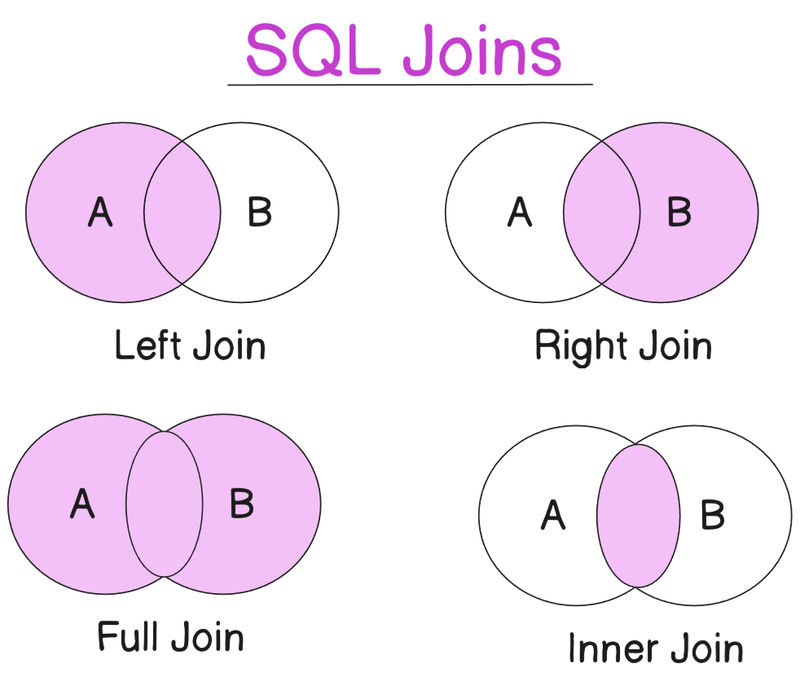
An INNER JOIN returns only the matching rows from both tables. Rows that don't have a match in the other table are excluded.
SELECT users.name, addresses.city
FROM users
INNER JOIN addresses ON users.id = addresses.user_id;Output:
| name | city |
|---|---|
| Aarav | Mumbai |
| Sneha | Kolkata |
Explanation: Raj is excluded because he has no address, and the row for Delhi is excluded because user_id 4 doesn't exist in the users table.
2. LEFT JOIN
A LEFT JOIN returns all rows from the left table (users) and only the matching rows from the right table (addresses). If a row in the left table has no match, the columns from the right table will show as NULL.
SELECT users.name, addresses.city
FROM users
LEFT JOIN addresses ON users.id = addresses.user_id;Output:
| name | city |
|---|---|
| Aarav | Mumbai |
| Sneha | Kolkata |
| Raj | NULL |
Explanation: Raj is included because he is in the left table, but since he has no address, the city is NULL.
3. RIGHT JOIN
A RIGHT JOIN returns all rows from the right table (addresses) and only the matching rows from the left table (users). If a row in the right table has no match, the columns from the left table will show as NULL.
SELECT users.name, addresses.city
FROM users
RIGHT JOIN addresses ON users.id = addresses.user_id;Output:
| name | city |
|---|---|
| Aarav | Mumbai |
| Sneha | Kolkata |
| NULL | Delhi |
Explanation: The row for Delhi is included because it is in the right table, but since its user_id has no match, the name is NULL.
Self JOIN
A Self JOIN is a regular join where a table is joined with itself. This is useful for finding relationships between rows within the same table, such as a referral system where one user refers another.
Example:
Let's add a referred_by_id column to the users table to track referrals. This column will hold the id of the user who referred them.
-
Modify the table:
ALTER TABLE users ADD COLUMN referred_by_id INT; -
Use a Self JOIN to get each user's name and the name of their referrer. We use a
LEFT JOINto include users who were not referred.SELECT a.id, a.name AS user_name, b.name AS referred_by FROM users a LEFT JOIN users b ON a.referred_by_id = b.id;
Explanation:
arefers to the user being queried.brefers to the user who referred them.- The
ONclause matches thereferred_by_idfrom tableawith theidfrom tableb.
Sample Output:
| id | user_name | referred_by |
|---|---|---|
| 1 | Aarav | NULL |
| 2 | Sneha | Aarav |
| 3 | Raj | Aarav |
| 4 | Fatima | Sneha |
Summary
| Type | Description |
|---|---|
INNER JOIN |
Returns only matching rows from both tables. |
LEFT JOIN |
Returns all rows from the left table and matching rows from the right. |
RIGHT JOIN |
Returns all rows from the right table and matching rows from the left. |
Self JOIN |
Joins a table with itself to find relationships between rows within the same table. Use aliases like a and b to distinguish between the two instances of the table. |
SQL UNION and UNION ALL
The UNION operator in SQL is used to combine the result sets of two or more SELECT statements. The key feature is that it removes duplicate rows from the combined result. If you want to include all rows, including duplicates, you use UNION ALL.
Example Scenario
Let's assume you have a users table for regular users and an admin_users table for administrators. You can use UNION to get a single, combined list of names from both tables.
Step 1: Create the admin_users Table
CREATE TABLE admin_users (
id INT PRIMARY KEY,
name VARCHAR(100),
email VARCHAR(100),
gender ENUM('Male', 'Female', 'Other'),
date_of_birth DATE,
salary INT
);
Step 2: Use UNION to Combine Data
To get a single list of unique names from both tables, you would use UNION.
SELECT name FROM users
UNION
SELECT name FROM admin_users;This will return a single list of names, automatically removing any duplicates that might exist in both tables.
Step 3: Using UNION ALL
If you want to keep all rows, including duplicates, you use UNION ALL. This is faster than UNION because it doesn't need to perform a check for duplicate rows.
SELECT name FROM users
UNION ALL
SELECT name FROM admin_users;Important Rules for UNION
- Matching Columns: Both
SELECTstatements must have the same number of columns and the corresponding columns must have compatible data types. - Column Aliases: The column names in the final result set are determined by the first
SELECTstatement. - Sorting: You can use
ORDER BYto sort the combined result set, but it must be placed after the very lastSELECTstatement.
Summary
| Operator | Behavior | Duplicate Rows | Performance |
|---|---|---|---|
UNION |
Combines result sets of multiple SELECT statements. |
Automatically removes duplicates. | Slower due to the de-duplication step. |
UNION ALL |
Combines result sets of multiple SELECT statements. |
Keeps all rows, including duplicates. | Faster as it skips the de-duplication step. |
MySQL Views
A view in MySQL is a virtual table created from a SELECT query. It does not store data itself but rather acts as a stored query, always reflecting the current data in the base tables. This makes views ideal for simplifying complex queries, reusing logic, and controlling data access by hiding sensitive columns from users.
Creating a View
To create a view, you use the CREATE VIEW statement followed by a SELECT query. For instance, to create a view showing users with a salary greater than ₹70,000, you'd use the following code:
CREATE VIEW high_salary_users AS
SELECT id, name, salary
FROM users
WHERE salary > 70000;After creation, you can query this view just like a regular table:
SELECT * FROM high_salary_users;This is a powerful way to simplify your interactions with a complex database schema.
Views and Live Data
The most important feature of a view is that it's always up-to-date. It doesn't store a copy of the data; it simply re-executes its underlying query every time it's accessed.
For example, if you update Raj's salary to ₹72,000 in the original users table:
UPDATE users
SET salary = 72000
WHERE name = 'Raj';When you query high_salary_users again, Raj will automatically be included in the results without any changes to the view itself.
Dropping a View
To remove a view from the database, use the DROP VIEW command:
DROP VIEW high_salary_users;This action only removes the view definition, not the underlying table or its data.
MySQL Indexes
Indexes in MySQL are data structures that improve the speed of data retrieval operations. They work like the index in a book, allowing the database engine to quickly locate rows based on the indexed column values without scanning the entire table.
Viewing Indexes
To see which indexes are defined on a table, you can use the SHOW INDEXES statement:
SHOW INDEXES FROM users;This command provides details on all indexes, including the primary key, which is automatically indexed.
Creating an Index
You can create an index on a single column to speed up queries that filter by that column. For instance, to index the email column, which might be frequently used in WHERE clauses, you'd run:
CREATE INDEX idx_email ON users(email);This will improve the performance of queries such as SELECT * FROM users WHERE email = 'example@example.com';
Multi-Column Indexes
When you frequently filter using a combination of columns, a multi-column index is more efficient than two separate single-column indexes. The order of columns in the index is crucial.
CREATE INDEX idx_gender_salary ON users(gender, salary);A query using WHERE gender = 'Female' AND salary > 70000; will benefit from this combined index. However, a query that only filters on salary may not use the index effectively because gender is the first column in the index.
Important Considerations
- Disk Space: Indexes consume extra disk space.
- Performance Trade-off: While they speed up
SELECTstatements, they can slightly slow downINSERT,UPDATE, andDELETEoperations because the index must also be updated. - Strategic Use: Only create indexes on columns that are frequently used in
WHEREclauses,JOINconditions, orORDER BYclauses.
Dropping an Index
To remove an index, use DROP INDEX:
DROP INDEX idx_email ON users;Subqueries in MySQL
A subquery is a query nested inside another query. They are a powerful tool for solving complex problems by breaking them down into simpler, logical steps. Subqueries can be used in the SELECT, WHERE, and FROM clauses of a query.
Scalar Subquery
A scalar subquery returns a single value and is often used in a WHERE clause for comparison. A common use case is comparing a column's value against an aggregate value from the same or another table. For example, to find all users who earn more than the average salary:
SELECT id, name, salary
FROM users
WHERE salary > (
SELECT AVG(salary) FROM users
);The inner query SELECT AVG(salary) FROM users is a scalar subquery that returns the single average salary value.
Subquery with IN
A subquery can also return a list of values to be used with the IN operator. This is useful for filtering rows based on a dynamic list of criteria. For instance, to find users referred by someone earning more than ₹75,000:
SELECT id, name, referred_by_id
FROM users
WHERE referred_by_id IN (
SELECT id FROM users WHERE salary > 75000
);The inner query returns a list of IDs, and the outer query checks if referred_by_id is present in that list.
Subquery in SELECT
Subqueries can also be used in the SELECT clause to display a calculated value for each row.
SELECT name, salary,
(SELECT AVG(salary) FROM users) AS average_salary
FROM users;This query shows each user's salary and, for context, the overall average salary as a separate column.
GROUP BY and HAVING in MySQL
The GROUP BY clause is used to group rows that have the same values into summary rows. This is typically used in conjunction with aggregate functions like COUNT, SUM, AVG, MIN, and MAX. The HAVING clause is then used to filter these grouped results.
GROUP BY Example
To find the average salary for each gender in your users table, you would group the rows by gender and then apply the AVG function:
SELECT gender, AVG(salary) AS average_salary
FROM users
GROUP BY gender;This query consolidates all male users into one group and all female users into another, then calculates the average salary for each.
HAVING Clause
The HAVING clause is used to filter groups of rows, similar to how a WHERE clause filters individual rows. The key difference is that HAVING can operate on the results of aggregate functions.
To display only the genders where the average salary is greater than ₹75,000, you would use HAVING:
SELECT gender, AVG(salary) AS avg_salary
FROM users
GROUP BY gender
HAVING AVG(salary) > 75000;A WHERE clause would not work here because the average salary is calculated after the GROUP BY operation.
ROLLUP
The WITH ROLLUP modifier is used with GROUP BY to generate subtotals and a grand total.
SELECT gender, COUNT(*) AS total_users
FROM users
GROUP BY gender WITH ROLLUP;This query will return the count of users for each gender and a final row with the total count for all genders.
Stored Procedures in MySQL
A stored procedure is a pre-compiled block of SQL statements that is stored on the database server. It can be executed with a single call, which makes it ideal for complex, repetitive tasks. Stored procedures are useful for code reuse, improving performance by reducing network traffic, and enhancing security.
Changing the Delimiter
By default, MySQL uses the semicolon (;) to signify the end of a statement. When defining a stored procedure, which contains multiple statements, this can cause an error. The DELIMITER command is used to temporarily change this character.
DELIMITER $$
CREATE PROCEDURE AddUser(
IN p_name VARCHAR(100),
IN p_email VARCHAR(100),
IN p_gender ENUM('Male', 'Female', 'Other'),
IN p_dob DATE,
IN p_salary INT
)
BEGIN
INSERT INTO users (name, email, gender, date_of_birth, salary)
VALUES (p_name, p_email, p_gender, p_dob, p_salary);
END$$
DELIMITER ;After the procedure is defined, the delimiter is reset to the semicolon.
Calling a Procedure
To execute a stored procedure, you use the CALL statement with any necessary parameters:
CALL AddUser('Kiran Sharma', 'kiran@example.com', 'Female', '1994-06-15', 72000);Dropping a Procedure
To remove a stored procedure, use the DROP PROCEDURE statement:
DROP PROCEDURE IF EXISTS AddUser;Triggers in MySQL
A trigger is a special type of stored program that is automatically executed when a specific event occurs on a table, such as an INSERT, UPDATE, or DELETE. Triggers are useful for logging changes, enforcing business rules, and maintaining data consistency across tables.
Trigger Structure
Triggers are defined with a specific timing (BEFORE or AFTER) and action (INSERT, UPDATE, or DELETE).
CREATE TRIGGER trigger_name
AFTER INSERT ON table_name
FOR EACH ROW
BEGIN
-- statements to execute
END;Example: Logging a New User
To demonstrate, let's create a trigger that logs every new user insertion into a separate user_log table.
-
Create the log table:
CREATE TABLE user_log ( id INT AUTO_INCREMENT PRIMARY KEY, user_id INT, name VARCHAR(100), created_on TIMESTAMP DEFAULT CURRENT_TIMESTAMP ); -
Create the trigger:
DELIMITER $$ CREATE TRIGGER after_user_insert AFTER INSERT ON users FOR EACH ROW BEGIN INSERT INTO user_log (user_id, name) VALUES (NEW.id, NEW.name); END$$ DELIMITER ;Within a trigger,
NEW.columnrefers to the new row's data forINSERTandUPDATEoperations. Similarly,OLD.columnrefers to the original data forUPDATEandDELETEoperations. -
Test the trigger: When you call the
AddUserstored procedure, the trigger will automatically insert a row into theuser_logtable.CALL AddUser('Ritika Jain', 'ritika@example.com', 'Female', '1996-03-12', 74000);Running
SELECT * FROM user_log;will show the new entry.
Dropping a Trigger
To remove a trigger, use the DROP TRIGGER statement:
DROP TRIGGER IF EXISTS after_user_insert;Summary
| Feature | Description | Key Use Cases |
|---|---|---|
| Views | A virtual table based on a SELECT query. Doesn't store data. |
Simplifying complex queries, hiding columns, live data snapshots. |
| Indexes | Data structure to speed up data retrieval operations. | Optimizing WHERE, JOIN, and ORDER BY clauses. |
| Subqueries | A query nested inside another query. | Filtering with dynamic conditions, performing multi-step logic. |
GROUP BY |
Groups rows with identical values in specified columns. | Calculating aggregates (COUNT, AVG) for groups. |
HAVING |
Filters groups of rows after aggregation. | Filtering results based on aggregate values (e.g., HAVING AVG(salary) > 75000). |
| Stored Procedures | A pre-compiled block of SQL code stored on the database server. | Encapsulating complex logic, improving performance, and code reuse. |
| Triggers | A program that executes automatically when a specific event occurs. | Logging changes, enforcing business rules, and synchronizing data. |
Advanced SQL & More
In this section, we’ll go beyond the basics of SQL and cover important features of MySQL transactions, AutoCommit behavior, logical operators, and advanced table operations.
These concepts will give you more control over your database operations, improve reliability, and help you write powerful queries.
1. MySQL Transactions and AutoCommit
By default, MySQL runs in AutoCommit mode — meaning every SQL statement is committed immediately after execution. This is fine for simple queries, but for critical operations (such as financial transactions), you’ll often want to disable AutoCommit and manage transactions manually.
Disabling AutoCommit
SET autocommit = 0;- AutoCommit is now off.
- Changes are temporary until you explicitly
COMMIT.
Important: If you forget to commit, your changes will not persist.
COMMIT — Save Changes
COMMIT;- Saves all changes since the last
COMMITorROLLBACK. - After this, changes are permanent.
ROLLBACK — Undo Changes
ROLLBACK;- Reverts everything since the last
COMMITorROLLBACK. - Useful for undoing mistakes in a transaction.
Example Workflow
SET autocommit = 0;
UPDATE users SET salary = 80000 WHERE id = 5;
-- If correct:
COMMIT;
-- If wrong:
ROLLBACK;Re-Enabling AutoCommit
SET autocommit = 1;Restores the default behavior: every statement is committed automatically.
Best Practices
- Use
COMMITwhen you’re confident changes are correct. - Use
ROLLBACKto undo changes if something goes wrong. - Disable AutoCommit for batch operations to avoid partial updates.
2. Essential MySQL Features
Logical Operators
Logical operators let you combine conditions in WHERE clauses:
| Operator | Description | Example |
|---|---|---|
AND |
All conditions must be true | salary > 50000 AND gender = 'Male' |
OR |
At least one condition is true | gender = 'Male' OR gender = 'Other' |
NOT |
Reverses a condition | NOT gender = 'Female' |
Add a Column to a Table
ALTER TABLE users
ADD COLUMN city VARCHAR(100);Adds a new column city to the users table.
Wildcard Operators
Used with LIKE for pattern matching:
| Wildcard | Description | Example |
|---|---|---|
% |
Matches any sequence | WHERE name LIKE 'A%' (names starting with A) |
_ |
Matches a single character | WHERE name LIKE '_a%' (second letter is a) |
LIMIT with OFFSET
SELECT * FROM users
ORDER BY id
LIMIT 5 OFFSET 10;Skips the first 10 rows and returns the next 5.
Alternative syntax:
SELECT * FROM users
ORDER BY id
LIMIT 10, 5;DISTINCT Keyword
SELECT DISTINCT gender FROM users;Returns only unique values.
TRUNCATE Keyword
TRUNCATE TABLE users;- Removes all rows but keeps the table structure.
- Faster than
DELETE, but cannot be rolled back in most environments.
CHANGE vs MODIFY Column
CHANGE — rename and change datatype
ALTER TABLE users
CHANGE COLUMN city location VARCHAR(150);MODIFY — only change datatype
ALTER TABLE users
MODIFY COLUMN salary BIGINT;In this Advanced SQL section, you learned how to:
- Manage transactions with
COMMIT,ROLLBACK, and AutoCommit. - Use logical operators for complex filtering.
- Modify table structures with
ALTER,ADD,CHANGE, andMODIFY. - Work with wildcards,
LIMIT,DISTINCT, andTRUNCATE.
Mastering these concepts allows you to write safer, more flexible, and more powerful SQL queries.
Summary : Entire Guide
Core SQL Commands & Concepts
The guide is structured around essential SQL commands and concepts.
Data Definition Language (DDL):
CREATE: Used to create a database or a table.USE: Used to select a database to work with.DROP: Used to permanently delete a database or a table.ALTER TABLE: Used to modify an existing table by adding, dropping, or modifying a column.
Data Manipulation Language (DML):
INSERT INTO: Adds new data rows to a table. It's recommended to specify column names for better safety and readability.SELECT: Queries data from a table, allowing selection of all or specific columns. It can be combined withWHEREfor filtering,ORDER BYfor sorting, andLIMITto restrict the number of rows returned.UPDATE: Modifies existing data. It's crucial to use aWHEREclause to avoid updating every row.DELETE: Removes rows from a table. Similar toUPDATE, it's best to use aWHEREclause.TRUNCATE TABLEremoves all rows but keeps the table structure and is faster thanDELETE.
Constraints, Functions, and Joins
Constraints: Constraints are rules that enforce data integrity. The handbook explains several key constraints:
PRIMARY KEY: Uniquely identifies each row, cannot beNULL, and isUNIQUE. A table can have only one.UNIQUE: Ensures all values in a column are different but allowsNULLvalues. A table can have multiple unique constraints.NOT NULL: Ensures a column must have a value.FOREIGN KEY: Creates a link between two tables, ensuring that a value in one table corresponds to a value in another. It's used to maintain data integrity between related data.
Functions: The handbook covers various SQL functions for data manipulation and analysis.
- Aggregate Functions:
COUNT(),SUM(),AVG(),MIN(), andMAX()return a single value from a set of rows. - String Functions:
LENGTH(),LOWER(),UPPER(), andCONCAT()are used for string manipulation. - Date Functions:
NOW(),YEAR(),DATEDIFF(), andTIMESTAMPDIFF()help with date and time operations.
Joins: Joins are used to combine rows from multiple tables.
INNER JOIN: Returns only the matching rows from both tables.LEFT JOIN: Returns all rows from the left table and matching rows from the right.RIGHT JOIN: Returns all rows from the right table and matching rows from the left.SELF JOIN: A table is joined with itself to find relationships between rows within the same table, such as a referral system.
Advanced Database Management
Transactions:
By default, MySQL has AutoCommit turned on, meaning every statement is a transaction. The handbook shows how to disable AutoCommit and manually manage transactions using COMMIT to save changes and ROLLBACK to revert them.
Views:
A view is a virtual table created from a SELECT query. It doesn't store data but reflects live data from the base tables, making it useful for simplifying complex queries or hiding columns.
Indexes: Indexes speed up data retrieval, much like a book's index. The handbook explains how to create and drop single or multi-column indexes to improve query performance.
Subqueries:
A subquery is a query nested inside another query, used to break down complex problems. They can be used in SELECT, WHERE, and FROM clauses.
Stored Procedures and Triggers:
- Stored Procedures: A saved SQL block that can be executed later to reuse logic.
- Triggers: A special program that automatically executes when an event (like
INSERTorUPDATE) occurs on a table, often used for logging or enforcing rules.
Tabular Summary
| Command/Concept | Purpose | Example |
|---|---|---|
| Data Types | Defines the type of data a column can hold. | VARCHAR(100), INT, DATE |
INSERT INTO |
Adds new rows of data. | INSERT INTO users (name) VALUES ('Alice'); |
SELECT |
Queries and retrieves data. | SELECT name, email FROM users; |
WHERE |
Filters rows based on a condition. | WHERE salary > 50000; |
JOIN |
Combines rows from multiple tables. | INNER JOIN addresses ON users.id = addresses.user_id; |
GROUP BY |
Groups rows with the same values. | GROUP BY gender; |
HAVING |
Filters groups based on an aggregate condition. | HAVING AVG(salary) > 75000; |
PRIMARY KEY |
Uniquely identifies each row in a table. | id INT PRIMARY KEY |
FOREIGN KEY |
Links tables together. | FOREIGN KEY (user_id) REFERENCES users(id) |
Code Examples
-- Creating a table with constraints and a foreign key
CREATE TABLE users (
id INT AUTO_INCREMENT PRIMARY KEY,
name VARCHAR(100) NOT NULL,
email VARCHAR(100) UNIQUE
);
CREATE TABLE addresses (
id INT AUTO_INCREMENT PRIMARY KEY,
user_id INT,
city VARCHAR(100),
FOREIGN KEY (user_id) REFERENCES users(id) ON DELETE CASCADE
);
-- Using an aggregate function with GROUP BY
SELECT gender, COUNT(*) AS total_users
FROM users
GROUP BY gender;
-- Creating and using a view
CREATE VIEW high_salary_users AS
SELECT id, name, salary
FROM users
WHERE salary > 70000;
SELECT * FROM high_salary_users;
-- Example of a self-join
SELECT
a.name AS user_name,
b.name AS referred_by
FROM users a
LEFT JOIN users b ON a.referred_by_id = b.id;