

Node.js for JavaScript Backend Development – A Complete Beginner's Guide
JavaScript has historically been used for client-side scripting in browsers. But with the rise of Node.js, JavaScript can now power both frontend and backend development. This shift has significantly changed the web development landscape, enabling developers to build full-stack applications using a single language.
This article serves as the first installment in a complete backend tutorial series built on JavaScript. We’ll begin by understanding Node.js at its core, walk through its architecture, installation, and command-line tools like npm, npx, and nvm, and explain foundational concepts such as REST APIs and non-blocking I/O.
Module 1: Introduction to Node.js
What is Node.js and why was it created?
Node.js is an open-source, cross-platform runtime environment that executes JavaScript code outside the browser. It is built on Chrome’s V8 JavaScript engine, which compiles JavaScript into highly optimized machine code.
Traditionally, JavaScript could only run in browsers. Node.js brought JavaScript to the server, allowing developers to build backend systems using the same language they use in the frontend.
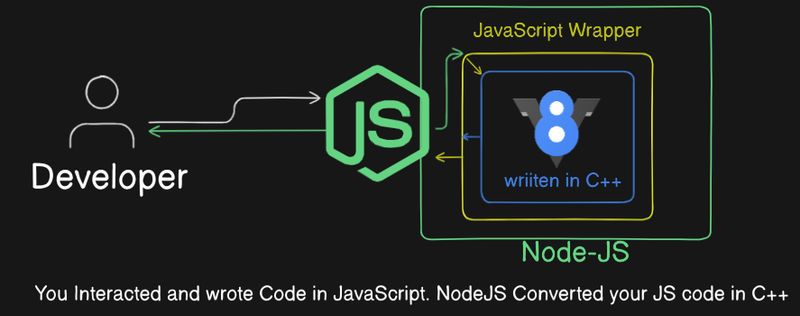
To answer the question
why node.js was created?
We need to understand the origin of Node.js, it’s important to examine the limitations of traditional web servers (e.g., Apache) and programming languages like PHP or Ruby.
In conventional architectures, servers often used multi-threaded blocking I/O, meaning each incoming request would occupy a thread. If the server received thousands of requests simultaneously, it would need an equal number of threads or a queueing mechanism, resulting in scalability problems.
Node.js was designed to solve this by using a single-threaded event loop with non-blocking I/O. This allows Node.js to handle thousands of concurrent connections efficiently, making it ideal for I/O-heavy applications like real-time chat systems or RESTful APIs.
So, In short: “Node.js is a JavaScript runtime built on Chrome's V8 JavaScript engine.”
Module 2: Installing Node.js
Step-1: Downloading Node.js
Visit the official Node.js download page:
You’ll find two versions available:
- LTS (Long-Term Support): Recommended for most users, especially in production environments.
- Current: Contains the latest features, ideal for testing and development purposes.
Select your operating system (Windows/macOS/Linux) and download the installer.
Step-2: Verifying Installation
After installing Node.js, open your terminal or command prompt and run:
node -v
npm -vThis verifies that both node and npm were successfully installed.
You may now also install VS Code, which is widely used for Node.js development: https://code.visualstudio.com

Module 3: Understanding Node.js Architecture
Node.js follows an event-driven, single-threaded architecture. Unlike traditional multi-threaded server models, Node.js uses a single thread to handle multiple client requests using an event loop.

Here’s what happens under the hood:
- When a request comes in, Node.js assigns it to a callback function.
- If the request requires I/O operations (like reading a file or querying a database), it delegates the task to the system kernel or libuv (an internal library).
- Meanwhile, Node.js continues processing other requests.
- When the I/O operation is complete, Node.js picks up the callback and executes it via the event loop.
This is called non-blocking I/O. It enables Node.js to serve thousands of concurrent connections with low memory overhead and minimal latency.
You can illustrate this concept using a flowchart or diagram showing the event loop, thread pool, and callback queue.
Module 4: Writing Your First Node.js Program
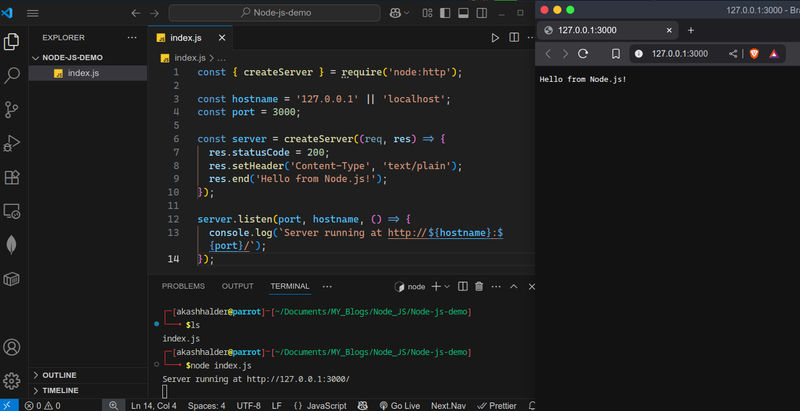
Let’s write a simple HTTP server in Node.js without using any external framework.
Create a file called index.js in your project folder and open it in VS Code:
// Importing the http module which has the capacity to create a server using the v8 engine.
const { createServer } = require('node:http');
const hostname = '127.0.0.1' || 'localhost';
const port = 3000;
const server = createServer((req, res) => {
res.statusCode = 200;
res.setHeader('Content-Type', 'text/plain');
res.end('Hello from Node.js!');
});
server.listen(port, hostname, () => {
console.log(`Server running at http://${hostname}:${port}/`);
});Run this file using:
node index.jsOpen your browser and go to http://localhost:3000. You should see the message "Hello from Node.js!".
Tip: We can render not only plain text but html also. We can send JSON response also. Here is an example below how to do it.
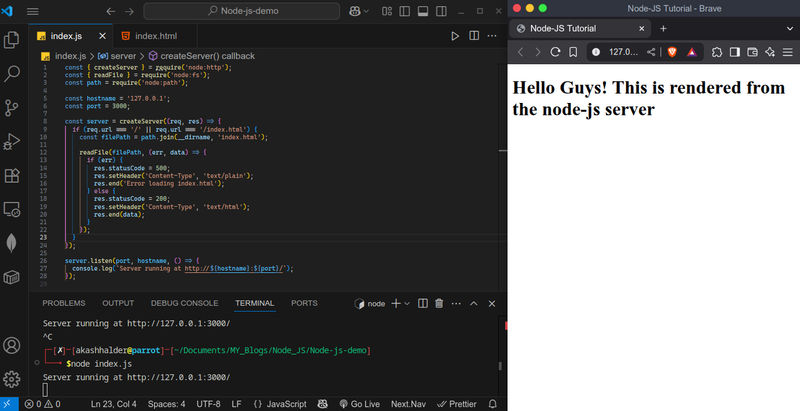
Note: Did you Noticed? I just stopped the Server. Why is that?
To reflect the changes we made in the same file we have to stop the server and run it again.
It's because the server don't know what code you changed. It is executing the code you wrote earlier. When youre-startthe server then it knows that you made a change. This is a Drawback of Node.js
Try Serving the JSON response by yourself.
Module 5: Understanding npm, npx, and nvm & Role of JS in Backend
Node.js comes with several essential tools in its ecosystem.
1. What is npm?
npm stands for Node Package Manager. It is used to:
- Install packages and libraries (e.g., Express, Axios)
- Manage project dependencies via
package.json - Run scripts
Example:
npm init -y # initializes a new project
npm install express # installs Express.js. If you want to learn it like this, comment 'Express'2. What is npx?
npx is a tool that allows you to execute packages without installing them globally.
Example:
npx create-react-app my-appThis will run the package without saving it permanently to your global environment.
3. What is nvm?
nvm stands for Node Version Manager. It allows you to install and manage multiple versions of Node.js on the same machine. It's basically manages a docker conatiner, we just pull it form it.
Checkout nvm from the official GitHub repository:
https://github.com/nvm-sh/nvm
4. The Role of JavaScript in Backend Development
Using Node.js, JavaScript can now handle:
- Server-side routing
- Handling HTTP requests and responses
- Managing databases (MongoDB, PostgreSQL, etc.)
- Authenticating users and managing sessions
- Serving frontend applications
This convergence of frontend and backend into a single language makes full-stack development more efficient and consistent.
Node JS is JavasScript run-time remember that, basically it creates server for you. So it only work is to serve your files on hitting a particular route.
Module 6: What is a REST API?
A REST API (Representational State Transfer API) lets a client (like a frontend app) communicate with a server over HTTP. It is widely used for building backend services that send and receive data, usually in JSON format.
REST APIs follow certain key principles:
- Stateless: Each request is independent.
- Client-server: The frontend and backend are separate.
- Uniform interface: A consistent structure using URLs and HTTP methods.
Common HTTP Methods
GET– fetch dataPOST– create new dataPUT– replace existing dataPATCH– update part of the dataDELETE– remove data
Example: User API Endpoints
GET /users→ list usersPOST /users→ add a userGET /users/1→ get user with ID 1PUT /users/1→ fully update user 1PATCH /users/1→ partially update user 1DELETE /users/1→ delete user 1
You’ll use these routes to perform full CRUD operations (Create, Read, Update, Delete) on your backend.
Let’s now see how to build this using pure Node.js.
-
Create a file named
script.js. In this we are going to perform Create, Read, Update, Delete (CRUD) operation using a Array. Later you can use a Database NoSQL/SQL. -
Yes you heard it right! Nodejs can also be used with RDMS, SQL database. Infact the article you are reading is also coming from a SQL Database.
const http = require('http'); let users = []; // Fake in-memory database let idCounter = 1; const server = http.createServer((req, res) => { const { method, url } = req; const parts = url.split('/'); const isUserRoute = parts[1] === 'users'; const userId = parseInt(parts[2]); let body = ''; req.on('data', chunk => body += chunk); req.on('end', () => { const data = body ? JSON.parse(body) : {}; // GET /users if (method === 'GET' && url === '/users') { res.writeHead(200, { 'Content-Type': 'application/json' }); res.end(JSON.stringify(users)); } // GET /users/:id else if (method === 'GET' && isUserRoute && userId) { const user = users.find(u => u.id === userId); if (user) { res.writeHead(200, { 'Content-Type': 'application/json' }); res.end(JSON.stringify(user)); } else { res.writeHead(404); res.end('User not found'); } } // POST /users else if (method === 'POST' && url === '/users') { const newUser = { id: idCounter++, ...data }; users.push(newUser); res.writeHead(201, { 'Content-Type': 'application/json' }); res.end(JSON.stringify(newUser)); } // PUT /users/:id else if (method === 'PUT' && isUserRoute && userId) { const index = users.findIndex(u => u.id === userId); if (index !== -1) { users[index] = { id: userId, ...data }; res.writeHead(200, { 'Content-Type': 'application/json' }); res.end(JSON.stringify(users[index])); } else { res.writeHead(404); res.end('User not found'); } } // PATCH /users/:id else if (method === 'PATCH' && isUserRoute && userId) { const user = users.find(u => u.id === userId); if (user) { Object.assign(user, data); res.writeHead(200, { 'Content-Type': 'application/json' }); res.end(JSON.stringify(user)); } else { res.writeHead(404); res.end('User not found'); } } // DELETE /users/:id else if (method === 'DELETE' && isUserRoute && userId) { const index = users.findIndex(u => u.id === userId); if (index !== -1) { users.splice(index, 1); res.writeHead(204); res.end(); } else { res.writeHead(404); res.end('User not found'); } } // Fallback else { res.writeHead(404); res.end('Route not found'); } }); }); server.listen(3000, () => { console.log('Server running at http://localhost:3000'); }); -
Run the file using the command:
node script.js
How to Test
On Linux/macOS Terminal
curl http://localhost:3000/users
curl -X POST http://localhost:3000/users -H "Content-Type: application/json" -d '{"name": "Alice"}'
curl http://localhost:3000/users/1
curl -X PUT http://localhost:3000/users/1 -H "Content-Type: application/json" -d '{"name": "Updated"}'
curl -X PATCH http://localhost:3000/users/1 -H "Content-Type: application/json" -d '{"age": 25}'
curl -X DELETE http://localhost:3000/users/1On Windows PowerShell
Invoke-RestMethod -Uri http://localhost:3000/users -Method GET
Invoke-RestMethod -Uri http://localhost:3000/users -Method POST -Body (@{name='Alice'} | ConvertTo-Json) -ContentType "application/json"
Invoke-RestMethod -Uri http://localhost:3000/users/1 -Method GET
Invoke-RestMethod -Uri http://localhost:3000/users/1 -Method PUT -Body (@{name='Updated'} | ConvertTo-Json) -ContentType "application/json"
Invoke-RestMethod -Uri http://localhost:3000/users/1 -Method PATCH -Body (@{age=25} | ConvertTo-Json) -ContentType "application/json"
Invoke-RestMethod -Uri http://localhost:3000/users/1 -Method DELETESummary
Node.js is a foundational technology for modern backend development with JavaScript. It allows developers to write scalable, performant server-side applications using the same language used on the client side.
In this Module, we covered:
- What Node.js is and why it was created
- Installing Node.js and using essential tools like npm and npx
- Node’s architecture and non-blocking I/O model
- Writing a basic HTTP server in Node
- Understanding the role of REST APIs
This serves as your first step into backend development using JavaScript. From here, you can move on to learning about development tools like nodemon, using Express.js to build more powerful APIs, and structuring your projects for real-world applications.
If you liked this article and want to learn more about JS Backend. Like this article and Comment 'Want to Learn More' in this article comment section. Till then keep exploring and keep learning!
